Как поставить блок в Майнкрафте
Сегодня мы поговорим о блоках и ответим на вопросы многих начинающих игроков. Эта статья посвящена установке блоков в игре.
Как установить блок в Майнкрафте
Положите в инвентарь игрока блок, который вам необходимо поставить на поверхность. Например дерево или камень. Для этого зайдите в инвентарь. Жмите E на клавиатуре. Выбирайте блок и кладите его в нижнюю полоску с ячейками.
Далее жмите ESC на клавиатуре и выходите из инвентаря. Выбирайте нужный блок в полоске снизу (ЛКМ жмите для выбора левую кнопку мышки). Далее жмите ПКМ (правую кнопку мышки), наведя курсор на поверхность земли, чтобы поставить блок.
Как поставить блок командой
Чтобы поставить блок командой, откройте чат (T) или интерфейс командного блока. Введите туда одну из команд:
/setblock X Y Z <блок> [replace|destroy|keep], где keep означает пропустить препятствие, destroy — разрушить препятствие, replace — заменить.
Например команда поставит блок дерева на месте игрока:
Следующая команда поставит блок дерева на расстоянии от земли в один блок, в воздухе:
Команда поставит блок дерева впереди игрока на расстоянии одного блока и от земли на расстоянии в один блок:
1 minecraft:acacia_wood keep
Как поставить много блоков командой
Используйте команду быстрого заполнения блоками. Выглядит она так:
/fill XYZ XYZ<блок>
Например эта команда поставит сразу семь блоков дерева рядом с игроком:
Эта команда поставит 7 блоков дерева, перед игроком, в воздухе, на расстоянии 1 блок:
Таким образом можно разместить много блоков сразу, прописав их количество вместо координат XYZ и указав расстояние от игрока, или поверхности земли.
Команды / setblock
Определяет позицию блока, который нужно изменить. В Java Edition это должна быть позиция блока, состоящая из , и , каждый из которых должен быть целое число или нотация тильды и символа вставки. В Bedrock Edition это должны быть трехмерные координаты, состоящие из , и , каждая из которых должна быть числом с плавающей запятой или обозначением тильды и символа вставки.
JE : : block_state
BE: tileName: Block : Block
Определяет новый блок. В Java Edition это должен быть аргумент блока (не принимает теги блока). В Bedrock Edition это должен быть идентификатор блока.
Руководство по команде setblock
Setblock (от англ. set — «установить», block — «блок») — команда, которая размещает блок.
Содержание
Варианты команды [ ]
- Обычная команда:
- Команда с указанием состояний блока:
- Команда с указанием NBT данных:
- Команда с указанием состояний блока и NBT данных:
При указании NBT данных обязательно нужно заключать nbt и значение в кавычки, если они состоят из нескольких слов.
Название блока [ ]
Название блока записывается строчными латинскими буквами. Если в названии несколько слов, то они разделяются знаком подчеркивания » _ «.
Названия блоков можно предварять пространством имён minecraft: , а можно и нет. Для блоков из модификации пространством имён, обычно, является название модификации.
- minecraft:sandstone — песчаник;
- minecraft:stone_slab — каменная плита;
- minecraft:stone_pressure_plate — каменная нажимная пластина;
- white_wool — белая шерсть.
Состояния блоков [ ]
Состояния блока определяют некоторые параметры блока.
- Компаратор направлен в одну из 4 сторон ( facing=north|south|east|west ).
- Повторитель имеет задержку ( delay=1|2|3|4 ) и может быть активирован ( powered=true ) или неактивирован ( powered=false ).
- Ступени имеет различную форму ( shape=inner_left|inner_right|outer_left|outer_right|straight ).
Несколько возможных значений разделены вертикальной чертой | .
Настройка размещения блока [ ]
- replace — заменяет старый блок новым.
- destroy — подобен replace , но выбрасывает старый блок и его содержимое, как если бы он был добыт инструментом без чар.
- keep — заменяет только воздух указанным блоком.
По умолчанию replace .
Условие: Игрок стоит на открытом воздухе
Условие: Игрок стоит в узком каменном коридоре высотой в два блока
NBT-данные [ ]
Позволяет указать содержимое блока (если оно у него может быть). Все параметры опциональны.
How to Use the SetBlock Command in Minecraft
This Minecraft tutorial explains how to use the /setblock command with screenshots and step-by-step instructions.
You can replace a block with another block using the /setblock command in Minecraft. Let’s explore how to use this cheat (game command).
Supported Platforms
The /setblock command is available in the following versions of Minecraft:
| Platform | Supported (Version*) |
|---|---|
 Java Edition (PC/Mac) Java Edition (PC/Mac) |
Yes (1.7.2) |
 Pocket Edition (PE) Pocket Edition (PE) |
Yes (0.16.0) |
 Xbox 360 Xbox 360 |
No |
 Xbox One Xbox One |
Yes (1.2) |
 PS3 PS3 |
No |
 PS4 PS4 |
Yes (1.14.0) |
 Wii U Wii U |
No |
 Nintendo Switch Nintendo Switch |
Yes (1.5.0) |
 Windows 10 Edition Windows 10 Edition |
Yes (0.16.0) |
 Education Edition Education Edition |
Yes |
* The version that it was added or removed, if applicable.
NOTE: Pocket Edition (PE), Xbox One, PS4, Nintendo Switch, and Windows 10 Edition are now called Bedrock Edition. We will continue to show them individually for version history.
Requirements
To run game commands in Minecraft, you have to turn cheats on in your world.
SetBlock Command
- Java
- PE
- Xbox
- PS
- Nintendo
- Win10
- Edu
SetBlock Command in Minecraft Java Edition (PC/Mac)
In Minecraft Java Edition (PC/Mac) 1.13, 1.14, 1.15, 1.16, 1.17, 1.18, 1.19 and 1.20, the syntax to replace a block with another block is:
In Minecraft Java Edition (PC/Mac) 1.8, 1.9, 1.10, 1.11 and 1.12, the syntax to replace a block with another block is:
Definitions
- pos or x y z is the x y z coordinate for the block to replace.
- tileName is name of the replacement block. (See Minecraft Item Names)
- dataValue is optional. It is the variation of the block if more than one type exists for that tileName. (See Minecraft Data Values)
- oldBlockHandling is optional. It tells the command how to replace the block. The default behavior is replace. It can be one of the following values:
- replace — Replaces the block, including air.
- keep — Replaces the block if the block was air.
- destroy — Replaces the block, including air. Old block will be dropped and can then be collected as if it was mined with a pickaxe or shovel.
SetBlock Command in Minecraft Pocket Edition (PE)
In Minecraft Pocket Edition (PE), the syntax to replace a block with another block is:
Definitions
- position is the x y z coordinate for the block to replace.
- tileName is name of the replacement block. (See Minecraft Item Names)
- blockStates replaces the old tileData parameter. It is enclosed in [ ] and identifies specific properties of titleName such as ["color":"black"] (See our Bedrock Fill generator for blockStates)
- replace is optional. It tells the command to replace the block, including air. This is the default behavior.
- keep is optional. It tells the command to replace the block if the block was air.
- destroy is optional. It tells the command to replace the block, including air. The old block will be dropped and can then be collected as if it was mined with a pickaxe or shovel.
SetBlock Command in Minecraft Xbox One Edition
In Minecraft Xbox One Edition, the syntax to replace a block with another block is:
Definitions
- position is the x y z coordinate for the block to replace.
- tileName is name of the replacement block. (See Minecraft Item Names)
- blockStates replaces the old tileData parameter. It is enclosed in [ ] and identifies specific properties of titleName such as ["color":"black"] (See our Bedrock Fill generator for blockStates)
- replace is optional. It tells the command to replace the block, including air. This is the default behavior.
- keep is optional. It tells the command to replace the block if the block was air.
- destroy is optional. It tells the command to replace the block, including air. The old block will be dropped and can then be collected as if it was mined with a pickaxe or shovel.
SetBlock Command in Minecraft PS4 Edition
In Minecraft PS4 Edition, the syntax to replace a block with another block is:
Definitions
- position is the x y z coordinate for the block to replace.
- tileName is name of the replacement block. (See Minecraft Item Names)
- blockStates replaces the old tileData parameter. It is enclosed in [ ] and identifies specific properties of titleName such as ["color":"black"] (See our Bedrock Fill generator for blockStates)
- replace is optional. It tells the command to replace the block, including air. This is the default behavior.
- keep is optional. It tells the command to replace the block if the block was air.
- destroy is optional. It tells the command to replace the block, including air. The old block will be dropped and can then be collected as if it was mined with a pickaxe or shovel.
SetBlock Command in Minecraft Nintendo Switch Edition
In Minecraft Nintendo Switch Edition, the syntax to replace a block with another block is:
Definitions
- position is the x y z coordinate for the block to replace.
- tileName is name of the replacement block. (See Minecraft Item Names)
- blockStates replaces the old tileData parameter. It is enclosed in [ ] and identifies specific properties of titleName such as ["color":"black"] (See our Bedrock Fill generator for blockStates)
- replace is optional. It tells the command to replace the block, including air. This is the default behavior.
- keep is optional. It tells the command to replace the block if the block was air.
- destroy is optional. It tells the command to replace the block, including air. The old block will be dropped and can then be collected as if it was mined with a pickaxe or shovel.
SetBlock Command in Minecraft Windows 10 Edition
In Minecraft Windows 10 Edition, the syntax to replace a block with another block is:
Definitions
- position is the x y z coordinate for the block to replace.
- tileName is name of the replacement block. (See Minecraft Item Names)
- blockStates replaces the old tileData parameter. It is enclosed in [ ] and identifies specific properties of titleName such as ["color":"black"] (See our Bedrock Fill generator for blockStates)
- replace is optional. It tells the command to replace the block, including air. This is the default behavior.
- keep is optional. It tells the command to replace the block if the block was air.
- destroy is optional. It tells the command to replace the block, including air. The old block will be dropped and can then be collected as if it was mined with a pickaxe or shovel.
SetBlock Command in Minecraft Education Edition
In Minecraft Education Edition, the syntax to replace a block with another block is:
Definitions
- position is the x y z coordinate for the block to replace.
- tileName is name of the replacement block. (See Minecraft Item Names)
- tileData is optional. It is the data value for the replacement block. It identifies the variation of the block if more than one type exists for that tileName. (See Minecraft Data Values)
- replace is optional. It tells the command to replace the block, including air. This is the default behavior.
- keep is optional. It tells the command to replace the block if the block was air.
- destroy is optional. It tells the command to replace the block, including air. The old block will be dropped and can then be collected as if it was mined with a pickaxe or shovel.
Examples
- Java
- PE
- Xbox
- PS
- Nintendo
- Win10
- Edu
Example in Java Edition (PC/Mac) 1.13, 1.14, 1.15, 1.16, 1.17, 1.18, 1.19 and 1.20
To replace a block that is 1 block East and 1 block South with birch planks in Minecraft 1.13, 1.14, 1.15, 1.16, 1.17, 1.18, 1.19 and 1.20:
To replace the block beneath you with prismarine stairs:
To replace the block at the coordinates (-209, 69, 2) with a jungle trapdoor:
Example in Java Edition (PC/Mac) 1.11 and 1.12
To replace a block that is 1 block East and 1 block South with birch planks in Minecraft 1.11 and 1.12:
To replace the block beneath you with a diamond block:
To replace the block at the coordinates (-126, 65, 229) with obsidian:
Example in Pocket Edition (PE)
To replace a block that is 5 blocks West and 3 blocks South with lime carpet in Minecraft PE:
To replace the block beneath you with iron ore:
To replace the block at the coordinates (22, 68, 36) with glowstone:
Example in Xbox One Edition
To replace a block that is 8 blocks East and 12 blocks South with purple concrete powder in Minecraft Xbox One Edition:
To replace the block beneath you with bedrock:
To replace the block at the coordinates (4, 61, -5) with a redstone lamp:
Example in PS4 Edition
To replace a block that is 2 blocks West and 7 blocks South with orange concrete in Minecraft PS4 Edition:
To replace the block beneath you with a honey block:
To replace the block at the coordinates (10, 64, -20) with a honeycomb block:
Example in Nintendo Switch Edition
To replace a block that is 9 blocks West and 2 blocks North with spruce planks in Minecraft Nintendo Switch Edition:
To replace the block beneath you with purple glazed terracotta:
To replace the block at the coordinates (-7, 62, 29) with a sea lantern:
Example in Windows 10 Edition
To replace a block that is 16 blocks East and 4 blocks North with a purpur pillar in Minecraft Windows 10 Edition:
To replace the block beneath you with netherrack:
To replace the block at the coordinates (31, 64, 5) with soul sand:
Example in Education Edition
To replace a block that is 2 blocks East and 7 blocks North with blue wool in Minecraft Education Edition:
To replace the block beneath you with glass:
To replace the block at the coordinates (8, 67, 26) with bedrock:
How to Enter the Command
1. Open the Chat Window
The easiest way to run a command in Minecraft is within the chat window. The game control to open the chat window depends on the version of Minecraft:
- For Java Edition (PC/Mac), press the T key to open the chat window.
- For Pocket Edition (PE), tap on the chat button at the top of the screen.
- For Xbox One, press the D-Pad (right) alt=»xbox one» width=»21″ height=»21″ />on the controller.
- For PS4, press the D-Pad (right) alt=»ps4″ width=»21″ height=»21″ />on the controller.
- For Nintendo Switch, press the right arrow button on the controller.
- For Windows 10 Edition, press the T key to open the chat window.
- For Education Edition, press the T key to open the chat window.
2. Type the Command
In this example, we will replace a block with birch planks using the following command:
Type the command in the chat window. As you are typing, you will see the command appear in the lower left corner of the game window. Press the Enter key to run the command.
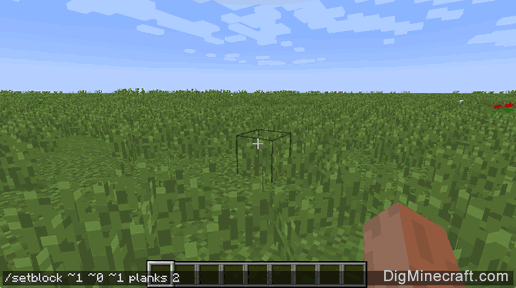
This /setblock command would replace the block at
1 with birch planks. This is the block that is 1 block East, 0 blocks downward, and 1 block South of where the command is run.
Item Description
(Minecraft ID Name)Minecraft
Data
Value
Oak Planks
(planks)0 
Spruce Planks
(planks)1 
Birch Planks
(planks)2 
Jungle Planks
(planks)3 
Acacia Planks
(planks)4 
Dark Oak Planks
(planks)5 For the replacement block, we use a name of planks and a DataValue of 2 to represent birch planks. See a list of all Minecraft Item Names and DataValues.
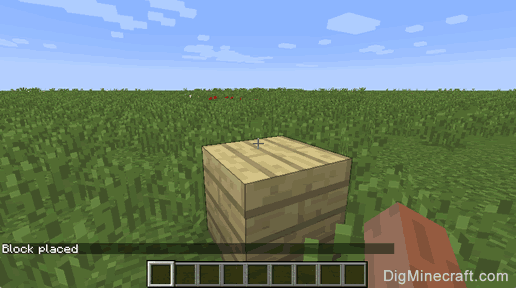
You will see the message " Block placed " appear in the lower left corner of the game window to indicate that the setblock command has completed.
Congratulations, you have learned how to use the /setblock command in Minecraft.