Pixel Format Not Accelerated
This error message is commonly caused by outdated video card drivers. To fix this, you generally need to update your video card drivers, please follow the directions for your Operating System below.
Causes
- Graphics drivers are outdated, they do not support required OpenGL support to run Minecraft.
- Invalid memory allocation, if you set any Java arguments in your Profile Settings, please remove them.
- On Windows 10, driver updates are automatically installed on your PC whereas previously they were optional. Sometimes the drivers obtained through Windows Update may not contain the proper OpenGL required for Minecraft. You should in this case update your PC’s graphics driver as explained below.
- On first- and second- generation Intel HD graphics chipsets, a Java version below 8u60 is needed on Windows 10. The new Minecraft launcher available on minecraft.net/download as a .MSI should automatically resolve issues on these chipsets. Please read on for further information on updating your graphics drivers.
Windows
- Hold your Windows key then hit R together, to bring up a run dialogue.
- Type “dxdiag” in the Run window and press enter.
- When a DxDiag window opens, browse to the ‘Display’ tab.
- You should get an output similar to this.
- Look for the Name and Manufacturer name part. Once you have found this, look for your manufacturer in the table below and go to their “Auto-Detector” site and scan your computer for any out-of-date drivers. If one is found, install it; if for any reason there are no available updates or the updates do not solve your issue, please get a DxDiag report and then join our Discord and ask for help.
Linux
Warning! Most Linux distributions provide a way to install drivers with its package manager. It is highly recommended you use the distro’s packages for drivers; not doing so can cause problems later!
- Open your terminal.
-
Enter in lspci -v less - Look for the line that says VGA Compatible or Video Controller.
- Look for the Manufacturer and model name.
- Install the necessary driver from the website:
macOS
Most Apple computers come with built-in drivers and a graphics card that cannot be changed. For these reasons, there is no need to manually update your graphics drivers.
Instead, you should make sure that your computer is up-to-date using the “Software Update” pane in System Preferences.
[Fixed] Error: org.lwjgl.LWJGLException: Pixel format not accelerated
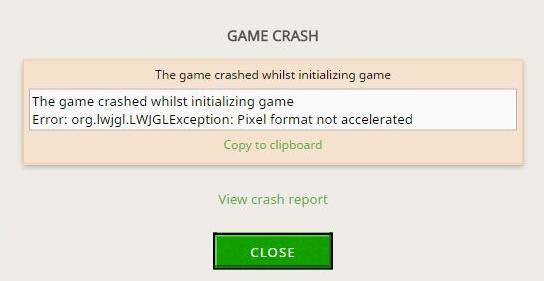
If you see “Error: org.lwjgl.LWJGLException: Pixel format not accelerated” when launching Minecraft on your computer, don’t panic. This is a common error and you can fix it easily.
This issue generally occurs because of your graphics card issue. If your graphics card driver is missing or out of date, you’re likely to run into this error when open your game. Another possible cause is the hardware issue. But don’t worry. We’ll help you resolve the issue and get the game up running in no time.
Try these fixes
Fix 1: Install the latest patch
Since many technical problems can be resolved by restarting, it never hurts to restart your computer and your game. Often this will be enough to fix the error.
Game developers always keep releasing patches to improve their games and fix any issues, so you should check for updates of your game in Steam or from the official website. Then install the latest patch to keep it up to date. This can fix some issues like the Pixel format not accelerated in Minecraft.
Fix 2: Disconnect the hardware device
If you’ve connected some gamepad devices like headset or game controller, you’ll also have this “Pixel format not accelerated” error. Trying disconnecting these devices from your computer, restart your computer then restart Minecraft again to see if it fixes the issue.
Fix 3: Update your graphics card driver
A missing or outdated video card driver in your computer can cause the error of Pixel format not accelerated in Minecraft, so you should make sure that the graphics card driver in your computer is up to date, and update it if it’s not.
There are two ways to update your graphics card driver: manually and automatically.
Manually update the driver: You should go to the manufacturer website of your graphics card, find the latest version of the driver and install it in your computer. Ensure to download the latest correct driver that is compatible with your computer operating system. This requires time and computer skills.
Automatically update the driver: If you don’t have time or patience, you can do it automatically with Driver Easy.
Driver Easy will automatically recognize your system and find the correct drivers for it. You don’t need to know exactly what system your computer is running, you don’t need to risk downloading and installing the wrong driver, and you don’t need to worry about making a mistake when installing.
You can update your drivers automatically with either the FREE or the Pro version of Driver Easy. But with the Pro version it takes just 2 clicks (and you get full support and a 30-day money back guarantee):
- Downloadand install Driver Easy.
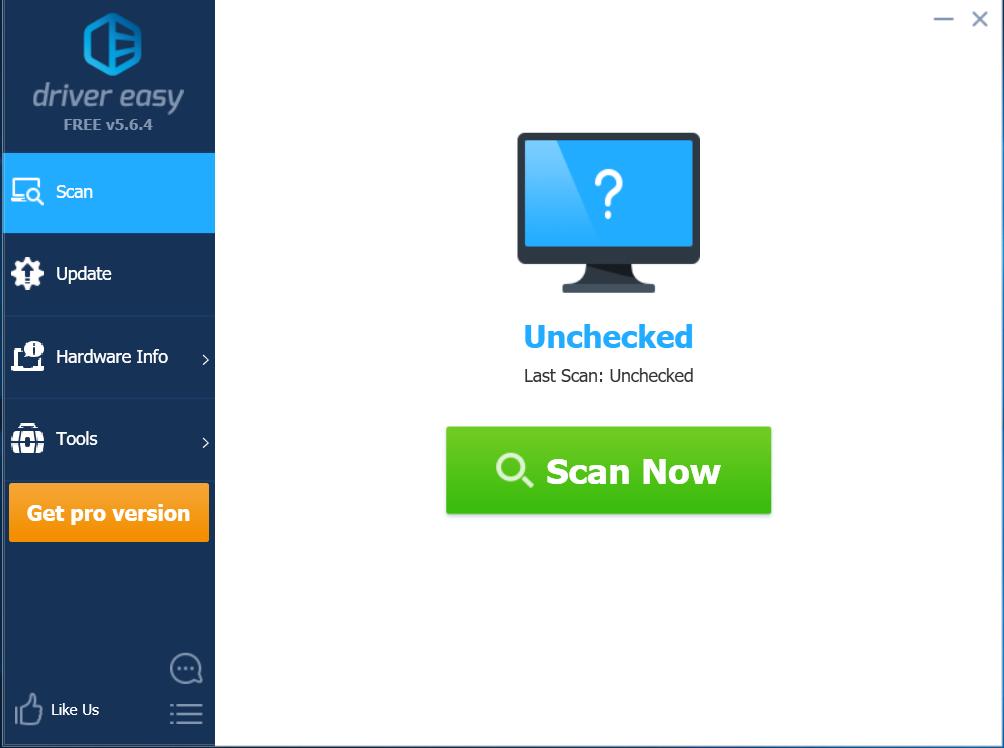
- Run Driver Easy and click the Scan Now button. Driver Easy will then scan your computer and detect any problem drivers.
- Restart your computer to take effect.
After updating your graphics card driver, launch your Minecraft again to see if it fixes the error.
Note: some people are having this issue after updating their graphics drivers. If that’s the case, you can try to downgrade the driver to fix the error. You can manually restore your driver or you can try the Driver Restore feature in Driver Easy. 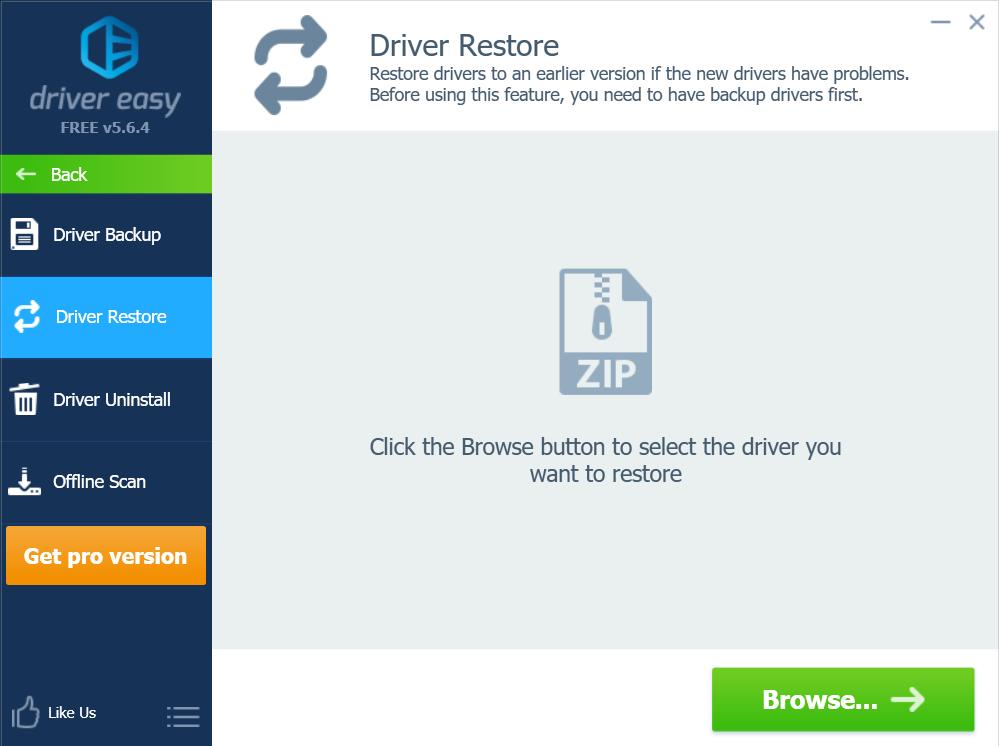
That’s it. Hope this post helps in resolving the Minecraft Pixel format not accelerated issue in your computer. You’re welcome to add a comment below to let us know if these fixes resolved your issue. If you have any other issues, feel free to let us know, and we’ll do our best to help.
Pixel format not accelerated.
Pixel format not accelerated пишет вам Minecraft при запуске на Windows 10. Проблема в том, что компьютер у вас – по меркам Windows 10 является калькулятором. В данном случае установлена Intel HD 2000 видеокарта, для которой сам Intel под Win10 драйвера не делает, а Microsoft предлагает только универсальные драйвера с базовой функциональностью. А в ней нет OpenGL. То есть если на Windows 7 на этом же калькуляторе Minecraft работал, то на Win 10 отказывается. Впрочем, выход есть. Заходим в установленные программы, и удаляем оттуда свежую версию Java. Теперь ищем Java версии 8 билд 45 – именно этот – скачиваем для Windows 32 bit и 64bit а для Windows 64 bit нужно скачать еще и этот файл и устанавливаем. Еще раз – под Win 32бит нужно установить только 32 битную версию, а для Win 64 – и 32 битную, и 64 битную по очереди.
Если в момент установки старой явы установщик открывай сайт в интернете и настойчиво предлагает установить новую, а не старую, то на время установки старого пакета просто отключи интернет.
Перезагружаем компьютер, и как видите – Minecraft заработал.
Обрати внимание, что если яву обновить, то Minecraft опять перестанет работать! Яву обновлять нельзя!
Minecraft Forums
This thread was marked as Locked by user-6840779 .
- Search
- Search all Forums
- Search this Forum
- Search this Thread
- Jump to Forum
Pixel Format Not Accelerated — Windows 10
- View User Profile
- View Posts
- Send Message

- Out of the Water
- Join Date: 8/14/2015
- Posts: 8
- Member Details
Hello, this is my first thread to the Minecraft forums.
I’ve recently gotten Windows 10, I thoroughly enjoy it, but I have one slight problem when I open my Minecraft launcher and hit ‘Play’ it goes down like it is booting up then it comes back and says gives me the crash report and a link to this http://hopper.minecraft.net/help/pixel-format-not-accelerated/ I use Nvidia and as I said before I use Windows I’ve done what it said and it still doesn’t work.
Here are my computer settings:
Edition — Windows 10 Home
Processor — Intel(R) Core(TM) 15-5200U CPU @ 2.20GHz
Installed RAM — 8.00 GB
System type — 64-BitDescription: Initializing game
org.lwjgl.LWJGLException: Pixel format not accelerated
at org.lwjgl.opengl.WindowsPeerInfo.nChoosePixelFormat(Native Method)
at org.lwjgl.opengl.WindowsPeerInfo.choosePixelFormat(WindowsPeerInfo.java:52)
at org.lwjgl.opengl.WindowsDisplay.createWindow(WindowsDisplay.java:247)
at org.lwjgl.opengl.Display.createWindow(Display.java:306)
at org.lwjgl.opengl.Display.create(Display.java:848)
at org.lwjgl.opengl.Display.create(Display.java:757)
at org.lwjgl.opengl.Display.create(Display.java:739)
at ave.ap(SourceFile:534)
at ave.am(SourceFile:363)
at ave.a(SourceFile:310)
at net.minecraft.client.main.Main.main(SourceFile:124)— Head —
Stacktrace:
at org.lwjgl.opengl.WindowsPeerInfo.nChoosePixelFormat(Native Method)
at org.lwjgl.opengl.WindowsPeerInfo.choosePixelFormat(WindowsPeerInfo.java:52)
at org.lwjgl.opengl.WindowsDisplay.createWindow(WindowsDisplay.java:247)
at org.lwjgl.opengl.Display.createWindow(Display.java:306)
at org.lwjgl.opengl.Display.create(Display.java:848)
at org.lwjgl.opengl.Display.create(Display.java:757)
at org.lwjgl.opengl.Display.create(Display.java:739)
at ave.ap(SourceFile:534)
at ave.am(SourceFile:363)— Initialization —
Details:
Stacktrace:
at ave.a(SourceFile:310)
at net.minecraft.client.main.Main.main(SourceFile:124)— System Details —
Details:
Minecraft Version: 1.8.8
Operating System: Windows 10 (amd64) version 10.0
Java Version: 1.8.0_25, Oracle Corporation
Java VM Version: Java HotSpot(TM) 64-Bit Server VM (mixed mode), Oracle Corporation
Memory: 58451608 bytes (55 MB) / 160899072 bytes (153 MB) up to 1060372480 bytes (1011 MB)
JVM Flags: 6 total; -XX:HeapDumpPath=MojangTricksIntelDriversForPerformance_javaw.exe_minecraft.exe.heapdump -Xmx1G -XX:+UseConcMarkSweepGC -XX:+CMSIncrementalMode -XX:-UseAdaptiveSizePolicy -Xmn128M
IntCache: cache: 0, tcache: 0, allocated: 0, tallocated: 0
Launched Version: 1.8.8
LWJGL: 2.9.4
OpenGL:RuntimeException: No OpenGL context found in the current thread.
GL Caps:
Using VBOs: No
Is Modded: Probably not. Jar signature remains and client brand is untouched.
Type: Client (map_client.txt)
Resource Packs:
Current Language:NullPointerException: null
Profiler Position: N/A (disabled)
CPU: <unknown>Thank you for taking your time to read this, if you need anymore information (launch logs, etc..) I will provide it.
- View User Profile
- View Posts
- Send Message
- Out of the Water
- Join Date: 8/14/2015
- Posts: 8
- Member Details
There you are, that is all it gave me.
- View User Profile
- View Posts
- Send Message
- Out of the Water
- Join Date: 8/14/2015
- Posts: 8
- Member Details
please post a dxdiag log
- View User Profile
- View Posts
- Send Message
- Full Stack
- Join Date: 10/29/2010
- Posts: 65
- Member Details
DirectX has nothing to do with this, since MC uses OpenGL
Go into your settings and turn off fullscreen. If that works for you (it should) you can go into your profile and specify a new resolution size if the window is too small for you.
- View User Profile
- View Posts
- Send Message
- Full Stack
- Join Date: 10/29/2010
- Posts: 65
- Member Details
I know what dxdiag does, it’s still not relevant. Java is platform independent. This is not a driver issue, it’s a Java or Minecraft problem.
The problem is fullscreen. Turn it off, the problem goes away.
- View User Profile
- View Posts
- Send Message
- Full Stack
- Join Date: 10/29/2010
- Posts: 65
- Member Details
YES IT IS, as you can see by the OP’s image the computer does not have any drivers installed
https://gyazo.com/942c2927adcb6280103d494c7ddfc6f5
end of discussion, if you do not know how to post the correct support do not post
You are incredibly rude. I had the same error today and resolved it by disabling fullscreen.
Copying and pasting is not support. Actually grappling with the errors and resolving them is.
- View User Profile
- View Posts
- Send Message
- Resident Fuzzball
- Join Date: 10/26/2012
- Posts: 8,771
- Location: Malaysia
- Minecraft: cestislife
- Member Details
You are incredibly rude. I had the same error today and resolved it by disabling fullscreen.
Copying and pasting is not support. Actually grappling with the errors and resolving them is.
While that may be true for you, but do you have the exact same specifications as OP? Please consider that there is no «universal» fix for every error and it is unique, and as you said, «actually grappling with the errors and resolving them», which is what webrosc is doing.
The «Pixel Format Not Accelerated» error happens because of 3 main things, as highlighted in this article, which by looking at the OP’s screenshots, seem to be that they do not have correct drivers installed, as indicated by having «Microsoft Basic Display Drivers», of which the system falls back to if they cannot find compatible drivers through the Windows Update Utility.
An error that is caused by turning fullscreen on however will not produce this error. On older Intel chipset systems, fullscreen mode would cause a driver error, and will develop in a hs_err_pid file being generated, of which explains the problematic frame and erroring driver component. An example of such a log here.
While webrosc might be a little harsh, but confusing the OP is not something we would want to do. Review your previous issue and compare it with what the OP has given us, you would see that it is largely different.
- View User Profile
- View Posts
- Send Message
- Full Stack
- Join Date: 10/29/2010
- Posts: 65
- Member Details
Is this 4Chan or Technical support?
You gave poor, ineffective information and I gave a viable workaround to attempt. That’s what a support community does, they help each other. webrosc was not at all helpful , and attempting to start a flame war is inexcusable.
Yes, I don’t have a high post count because I haven’t needed the support. However this issue is larger than one would think and a perfunctory search via Google would show that.
- View User Profile
- View Posts
- Send Message
- Out of the Water
- Join Date: 8/14/2015
- Posts: 8
- Member Details
thats not a dxdiag log thats a couple of screen shots of some of the needed information, do as explained here http://www.minecraftforum.net/topic/1742903-
- View User Profile
- View Posts
- Send Message
- Newly Spawned
- Join Date: 8/14/2015
- Posts: 1
- Member Details
SInce I have the exact same issue here is mine:
- View User Profile
- View Posts
- Send Message
- Out of the Water
- Join Date: 8/14/2015
- Posts: 8
- Member Details
While that may be true for you, but do you have the exact same specifications as OP? Please consider that there is no «universal» fix for every error and it is unique, and as you said, «actually grappling with the errors and resolving them», which is what webrosc is doing.
The «Pixel Format Not Accelerated» error happens because of 3 main things, as highlighted in this article, which by looking at the OP’s screenshots, seem to be that they do not have correct drivers installed, as indicated by having «Microsoft Basic Display Drivers», of which the system falls back to if they cannot find compatible drivers through the Windows Update Utility.
An error that is caused by turning fullscreen on however will not produce this error. On older Intel chipset systems, fullscreen mode would cause a driver error, and will develop in a hs_err_pid file being generated, of which explains the problematic frame and erroring driver component. An example of such a log here.
While webrosc might be a little harsh, but confusing the OP is not something we would want to do. Review your previous issue and compare it with what the OP has given us, you would see that it is largely different.
Thank you for those links they helped, but I still cant fix it, is there anymore help you can give with the pastebin I just supplied?
- View User Profile
- View Posts
- Send Message
- The Meaning of Life, the Universe, and Everything.
- Join Date: 4/8/2015
- Posts: 332
- Member Details
For OP, it appears you need this driver:
Download the windows 10 one and install it, and it should fix it.
- View User Profile
- View Posts
- Send Message
- Out of the Water
- Join Date: 8/14/2015
- Posts: 8
- Member Details
Could you say the exact one, I’m having difficulty finding the one you’re talking about.
- View User Profile
- View Posts
- Send Message
- The Meaning of Life, the Universe, and Everything.
- Join Date: 4/8/2015
- Posts: 332
- Member Details
It would be this one
Specifically you want the .exe one, as that will be the auto-installer.
- View User Profile
- View Posts
- Send Message
- Out of the Water
- Join Date: 8/14/2015
- Posts: 8
- Member Details
Is all of this correct?
- View User Profile
- View Posts
- Send Message
- The Meaning of Life, the Universe, and Everything.
- Join Date: 4/8/2015
- Posts: 332
- Member Details
- View User Profile
- View Posts
- Send Message
- 404: Member Not Found
- Location: New York
- Join Date: 5/20/2012
- Posts: 1,841
- Member Details
OP?
Is this 4Chan or Technical support?
You gave poor, ineffective information and I gave a viable workaround to attempt. That’s what a support community does, they help each other. webrosc was not at all helpful , and attempting to start a flame war is inexcusable.
Yes, I don’t have a high post count because I haven’t needed the support. However this issue is larger than one would think and a perfunctory search via Google would show that.
It’s disarming to hear you passing off information from the people that have been helping here for years «ineffective.» None of us are paid, nor are we obligated to helping users yet even so we take time into actually solving the issues that people may have.
As you are disputing the solution brought forward, you are implying that you are knowledgeable with the circumstances involved with the issue and are confident in the premise of the issue, that your solution will apply to the end user. When you encounter an issue you are given an opportunity to try and formulate a fix, but you are forgetting an important part — that being the cause of the issue. Thinking you have a solution to something without knowing the cause will come back to you once someone has an issue that cannot be resolved by your «fix».
You bring to your defense that you used Google to gather a perfunctory conclusion that the issue was nothing more than a rendering issue that affects a user when fullscreen mode is active. When I search up «pixel format not accelerated» I get sent to the Minecraft Hopper page entailing that a driver issue is the cause, and also lists «Graphics drivers are outdated» and «Invalid memory allocation» (I’ll come back to these later) as causes to the issue the OP (acronym used on forums for «original post[er]») was encountering. When you look things up you generally don’t look for a cause, you look for a solution — those solutions may not apply to everyone and you will never know unless you find the cause. In this case, the exception is being thrown by LWJGL (you can note the stack trace) due to it not being able to initiate OpenGL.
I intend to keep this simple, but I’ll try to explain the issue as thoroughly as I can.
Minecraft is written in Java, which runs on the Java Virtual Machine. When you’re writing Java code, you don’t target the host machine but instead that virtual machine. That VM grants Java code the ability to run in any operating system so long that someone has written a VM implementation for that OS. At the same time, this prohibits Minecraft from having low-level access to components like the system’s video card and thus there needs to be an intermediary that can run natively on an operating system, in this case that being LWJGL which acts as a wrapper allowing Minecraft to interface with OpenGL. So when Minecraft attempts to launch the game, it needs to load LWJGL so it can initiate OpenGL. When this call fails, you get the error as shown above and referred to as «Pixel format not accelerated» which is thrown by LWJGL as a wrapper to the native exception (sometimes LWJGL doesn’t catch the exception, resulting in access violation errors). It’s not the most descriptive of errors, but at the same time it wasn’t written with the intention to make it descriptive. If you’re getting along with this, you can see that there’s a large gap of possibilities for what went wrong.
For the most part, the inability to initiate OpenGL is due to one’s graphics drivers not supporting a proper implementation of OpenGL. It’s common enough that Intel has an article stating that «Graphics drivers that come with Microsoft Windows* or that are downloaded from Windows Update typically do not support OpenGL» — this is due to Intel choosing to not add OpenGL support in some of the drivers they push with Windows Update. That’s why people are forwarded to getting drivers from their hardware manufacturers instead of the drivers given by Windows Update (not in all cases!). The same can also be said for AMD, who have taken part in the same issue. Recently, Microsoft released Windows 10 (yay) which just as any OS upgrade has worked, remove graphics drivers and default to the generic graphics drivers provided by Microsoft for Windows 10, however these drivers don’t hardware acceleration and also not OpenGL. They basically are there to provide basic graphics functionality so Windows can function, nothing fancy. To reiterate as cestislife explained to you, Windows normally takes care of updating your drivers but in addition to what I just explained, Windows may not be able to find a proper driver at all, or the user hasn’t restarted their computer to finish installing Windows Updates that contain a driver update. Read more. I find it a bit dubious that you’re claiming to get PFNA errors anywhere but the initial game load, so please send the error log as well as the launcher logs and I’ll look into it.
Now, you dismissed webrosc’s correct advise to request a DxDiag report under the premises that DirectX is not used by Minecraft (the launcher does!). As while this is correct, it makes no difference as it gets the job done and has all the information we need. We don’t need a 3rd party tool to get system information when tools like dxdiag.exe and msinfo32.exe are provided by Microsoft for this exact purpose — getting system information concisely for debugging problems.
If you’ve gotten me so far, if you go back to what cestislife told you — to reiterate the majority of users encountering this error are due to them not having drivers that support proper a proper OpenGL implementation. See the link you were given and it should explain to you how to go about helping people update their drivers.
My apologies if this may sound a bit provocative, I’m posting this not only as a response to your claim that «the advice we’re giving is not helpful» but also as a reference for others that may come across this post.
If you have any further questions about the technical background on the issue, you should ask on the gamedev StackExchange here (or the off-topic section here even?) instead of replying here.