Железный голем
 Где найти
 Что даёт
 Команда

Железный голем Как сделать железный голем в Майнкрафт | Скриншот 1

Железный голем Как сделать железный голем в Майнкрафт | Скриншот 2

Железный голем Как сделать железный голем в Майнкрафт | Скриншот 3

Железный голем Как сделать железный голем в Майнкрафт | Скриншот 4

Железный голем Как сделать железный голем в Майнкрафт | Скриншот 5
Где найти
Что даёт
Команда
Железный голем — это моб, которого может сделать игрок самостоятельно. Но, в отличие от снежного голема, железный голем генерируется в больших деревнях и без участия игрока. Редко можно найти голема возле аванпоста разбойников, закрытого в клетке. Железный голем защищает жителей деревни от враждебных мобов, он создается сам в деревне при наличии там 10 жителей. Голем может напасть на игрока в ответ на атаку, либо защищая жителя, на которого напал игрок, но не нападает на того игрока, который его создал. Железный голем наносит большой урон мобам, потому что он не только бьет их руками, а еще и подбрасывает. Прирученных волков голем не атакует. Голем не может умереть от падения с горы или утопления, но может застрять в яме с водой, сгореть в лаве. Со временем голем получает повреждения — это видно по трещинам на нем. Его можно починить железными слитками. Голем очень полезен во время рейда, особенно при участии Разорителя.
Хитрости и советы
Как можно использовать железного голема в своих целях?
- Синонимы: Iron golem
- ID: iron_golem
- Версии Майнкрафт:1.17 / 1.16.5 / 1.16.4 / 1.16.3 / 1.16.2 / 1.16.1 / 1.16

Где найти железного голема
Здесь указано, где можно найти железного голема в Майнкрафте, т.е. где можно встретить железного голема в Minecraft.

Деревня жителей
Что даёт железный голем
Здесь перечислено, что можно получить из железного голема в Майнкрафте, т.е. дроп из железного голема в Minecraft.
Как заспавнить голема в майнкрафт командой — Игра Minecraft
Для того чтобы заспавнить голема в Minecraft командой, нужно открыть чат в игре и ввести команду:
После этого нажать Enter и появится железный голем. Обратите внимание, что символы «
» означают, что голем будет заспавнен в текущих координатах игрока.
Вы также можете изменить позицию, где будет заспавнен голем, заменив символы «
» на нужные координаты. Например, команда
/summon iron_golem 100 65 -200
заспавнит голема в координатах x=100, y=65, z=-200.
Кроме того, можно использовать и другие параметры для создания голема, такие как «CustomName» (для названия голема) и «MaxHealth» (для установки максимального количества здоровья). Например:
Данный код создаст голема с названием «Golem» и максимальным количеством здоровья 30 единиц.
Некоторые советы по заспавнению голема:
— Перед использованием команды убедитесь, что вам доступны права на использование команд в игре.
— Если голем не появляется или возникают какие-то проблемы, убедитесь, что вы правильно ввели команду.
— Важно помнить, что заспавненный голем будет защищать территорию от монстров и игроков (если он был создан в деревне), поэтому будьте осторожны и не создавайте голема на территории друзей без их разрешения.
How to Summon an Iron Golem in Minecraft
This Minecraft tutorial explains how to summon an iron golem with screenshots and step-by-step instructions.
You can summon an iron golem whenever you want using a cheat (game command) in Minecraft. This is done using the /summon command.
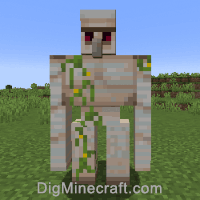
Let’s explore how to do this.
Supported Platforms
The command to summon an iron golem is available in the following versions of Minecraft:
| Platform | Supported (Version*) |
|---|---|
 Java Edition (PC/Mac) Java Edition (PC/Mac) |
Yes (1.7.2) |
 Pocket Edition (PE) Pocket Edition (PE) |
Yes (0.16.0) |
 Xbox 360 Xbox 360 |
No |
 Xbox One Xbox One |
Yes (1.2) |
 PS3 PS3 |
No |
 PS4 PS4 |
Yes (1.14.0) |
 Wii U Wii U |
No |
 Nintendo Switch Nintendo Switch |
Yes (1.5.0) |
 Windows 10 Edition Windows 10 Edition |
Yes (0.16.0) |
 Education Edition Education Edition |
Yes (0.14.2) |
* The version that it was added or removed, if applicable.
NOTE: Pocket Edition (PE), Xbox One, PS4, Nintendo Switch, and Windows 10 Edition are now called Bedrock Edition. We will continue to show them individually for version history.
Requirements
To run game commands in Minecraft, you have to turn cheats on in your world.
Summon Command
- Java
- PE
- Xbox
- PS
- Nintendo
- Win10
- Edu
Summon Command in Minecraft Java Edition (PC/Mac)
In Minecraft Java Edition (PC/Mac) 1.13, 1.14, 1.15, 1.16, 1.17, 1.18, 1.19 and 1.20, the syntax to summon an iron golem using the /summon command is:
In Minecraft Java Edition (PC/Mac) 1.11 and 1.12, the syntax to summon an iron golem is:
In Minecraft Java Edition (PC/Mac) 1.8, 1.9 and 1.10, the syntax to summon an iron golem is:
Definitions
- pos or x y z is optional. It is the x y z coordinate where the iron golem should spawn. If no coordinate is specified, the iron golem will spawn in the current location.
- dataTag is optional. It is a compound NBT tag (formerly called data tag) that sets a property for the iron golem such as
Summon Command in Minecraft Pocket Edition (PE)
In Minecraft Pocket Edition (PE) 1.16, 1.17, 1.18, 1.19 and 1.20, the syntax to summon an iron golem using the /summon command is:
In Minecraft Pocket Edition (PE) 1.12, 1.13 and 1.14, the syntax to summon an iron golem is:
In Minecraft Pocket Edition (PE) 1.1, 1.2, 1.3, 1.4, 1.5, 1.6, 1.7, 1.8, 1.9, 1.10 and 1.11, the syntax to summon an iron golem is:
In Minecraft Pocket Edition (PE) 1.0, the syntax to summon an iron golem is:
Definitions
- spawnPos is optional. It is the x y z coordinate where the iron golem should spawn. If no coordinate is specified, the iron golem will spawn in the current location.
- spawnEvent is optional. It is the name of a game event for the iron golem. See spawn events for iron golem.
- nameTag is the custom name to assign to the iron golem. It will appear as a nametag above the iron golem.
Summon Command in Minecraft Xbox One Edition
In Minecraft Xbox One Edition 1.16, 1.17, 1.18, 1.19 and 1.20, the syntax to summon an iron golem using the /summon command is:
In Minecraft Xbox One Edition 1.12, 1.13 and 1.14, the syntax to summon an iron golem is:
In Minecraft Xbox One Edition 1.11.4 and older, the syntax to summon an iron golem is:
Definitions
- spawnPos is optional. It is the x y z coordinate where the iron golem should spawn. If no coordinate is specified, the iron golem will spawn in the current location.
- spawnEvent is optional. It is the name of a game event for the iron golem. See spawn events for iron golem.
- nameTag is the custom name to assign to the iron golem. It will appear as a nametag above the iron golem.
Summon Command in Minecraft PS4 Edition
In Minecraft PS4 Edition 1.16, 1.17, 1.18, 1.19 and 1.20, the syntax to summon an iron golem using the /summon command is:
In Minecraft PS4 Edition 1.14, the syntax to summon an iron golem is:
Definitions
- spawnPos is optional. It is the x y z coordinate where the iron golem should spawn. If no coordinate is specified, the iron golem will spawn in the current location.
- spawnEvent is optional. It is the name of a game event for the iron golem. See spawn events for iron golem.
- nameTag is the custom name to assign to the iron golem. It will appear as a nametag above the iron golem.
Summon Command in Minecraft Nintendo Switch Edition
In Minecraft Nintendo Switch Edition 1.16, 1.17, 1.18, 1.19 and 1.20, the syntax to summon an iron golem using the /summon command is:
In Minecraft Nintendo Switch Edition 1.12, 1.13 and 1.14, the syntax to summon an iron golem is:
In Minecraft Nintendo Switch Edition 1.11.4 and older, the syntax to summon an iron golem is:
Definitions
- spawnPos is optional. It is the x y z coordinate where the iron golem should spawn. If no coordinate is specified, the iron golem will spawn in the current location.
- spawnEvent is optional. It is the name of a game event for the iron golem. See spawn events for iron golem.
- nameTag is the custom name to assign to the iron golem. It will appear as a nametag above the iron golem.
Summon Command in Minecraft Windows 10 Edition
In Minecraft Windows 10 Edition 1.16, 1.17, 1.18, 1.19 and 1.20, the syntax to summon an iron golem using the /summon command is:
In Minecraft Windows 10 Edition 1.12, 1.13 and 1.14, the syntax to summon an iron golem is:
In Minecraft Windows 10 Edition 1.1, 1.2, 1.3, 1.4, 1.5, 1.6, 1.7, 1.8, 1.9, 1.10 and 1.11, the syntax to summon an iron golem is:
In Minecraft Windows 10 Edition 1.0, the syntax to summon an iron golem is:
Definitions
- spawnPos is optional. It is the x y z coordinate where the iron golem should spawn. If no coordinate is specified, the iron golem will spawn in the current location.
- spawnEvent is optional. It is the name of a game event for the iron golem. See spawn events for iron golem.
- nameTag is the custom name to assign to the iron golem. It will appear as a nametag above the iron golem.
Summon Command in Minecraft Education Edition
In Minecraft Education Edition 1.14.31, 1.17.30 and 1.18.32, the syntax to summon an iron golem using the /summon command is:
In Minecraft Education Edition 1.12, the syntax to summon an iron golem is:
In Minecraft Education Edition 1.4, 1.7 and 1.9, the syntax to summon an iron golem is:
In Minecraft Education Edition 1.0, the syntax to summon an iron golem is:
Definitions
- spawnPos is optional. It is the x y z coordinate where the iron golem should spawn. If no coordinate is specified, the iron golem will spawn in the current location.
- spawnEvent is optional. It is the name of a game event for the iron golem. See spawn events for iron golem.
- nameTag is the custom name to assign to the iron golem. It will appear as a nametag above the iron golem.
Examples
- Java
- PE
- Xbox
- PS
- Nintendo
- Win10
- Edu
Example in Java Edition (PC/Mac) 1.13, 1.14, 1.15, 1.16, 1.17, 1.18, 1.19 and 1.20
To summon an iron golem in Minecraft 1.13, 1.14, 1.15, 1.16, 1.17, 1.18, 1.19 and 1.20:
To summon an iron golem that is named Guardian:
Example in Java Edition (PC/Mac) 1.11 and 1.12
To summon an iron golem in Minecraft 1.11 and 1.12:
To summon an iron golem that is named Ernie:
Example in Java Edition (PC/Mac) 1.8, 1.9 and 1.10
To summon an iron golem in Minecraft 1.8, 1.9 and 1.10:
To summon an iron golem that is named Protector:
Example in Pocket Edition (PE)
To summon an iron golem in Minecraft PE 1.1 and higher:
To summon an iron golem at the coordinates (12, 65, -8):
Example in Pocket Edition (PE) 1.0
To summon an iron golem in Minecraft PE 1.0:
Example in Xbox One Edition
To summon an iron golem in Minecraft Xbox One Edition:
To summon an iron golem that is 4 blocks West of your current position:
Example in PS4 Edition
To summon an iron golem in Minecraft PS4 Edition:
To summon an iron golem at the coordinates (8, 67, 100):
Example in Nintendo Switch Edition
To summon an iron golem in Minecraft Nintendo Switch Edition:
To summon an iron golem at the coordinates (8, 72, 100):
Example in Windows 10 Edition
To summon an iron golem in Minecraft Windows 10 Edition 1.1 and higher:
To summon an iron golem that is 1 block above your current position:
Example in Windows 10 Edition 1.0
To summon an iron golem in Minecraft Windows 10 Edition 1.0:
Example in Education Edition 1.0.18 and higher
To summon an iron golem in Minecraft Education Edition 1.0.18 and higher:
To summon an iron golem at the coordinates (-70, 63, 12):
Example in Education Edition 1.0
To summon an iron golem in Minecraft Education Edition 1.0:
How to Enter the Command
1. Open the Chat Window
The easiest way to run a command in Minecraft is within the chat window. The game control to open the chat window depends on the version of Minecraft:
- For Java Edition (PC/Mac), press the T key to open the chat window.
- For Pocket Edition (PE), tap on the chat button at the top of the screen.
- For Xbox One, press the D-Pad (right) alt=»xbox one» width=»21″ height=»21″ />on the controller.
- For PS4, press the D-Pad (right) alt=»ps4″ width=»21″ height=»21″ />on the controller.
- For Nintendo Switch, press the right arrow button on the controller.
- For Windows 10 Edition, press the T key to open the chat window.
- For Education Edition, press the T key to open the chat window.
2. Type the Command
In this example, we are going to summon an iron golem in Minecraft Java Edition (PC/Mac) 1.20 with the following command:
Type the command in the chat window. As you are typing, you will see the command appear in the lower left corner of the game window. Press the Enter key to run the command.
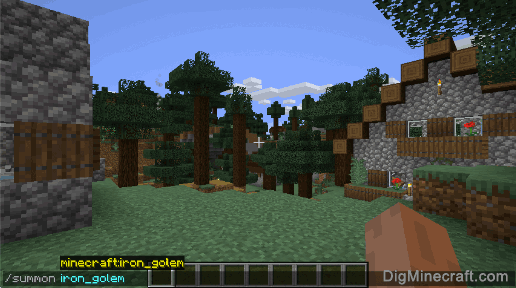
Once the cheat has been entered, the iron golem will spawn and appear in your world:
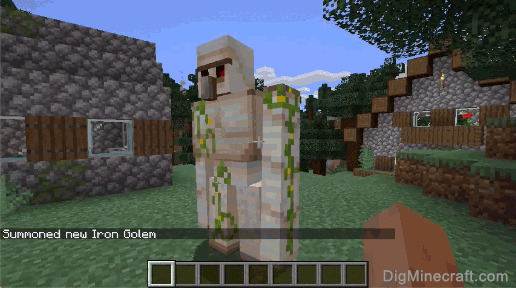
You will see the message " Summoned new Iron Golem " appear in the lower left corner of the game window to indicate that the iron golem has been summoned. You may need to look behind you to see it.
Congratulations, you have summoned an iron golem in Minecraft.
Command Generators
If you need help with /summon commands, you can use these tools to automatically generate commands for you:
Minecraft — Как заспавнить моба командой в майнкрафт и убить

Все команды на мобов Майнкрафт и команда на убийство мобов в майнкрафт. Для того чтоб начать вводить чит коды на Майнкрафт, нужно войти в игру и надавить T либо /, чтоб вызвать консоль — в ней и необходимо вводить коды. Для того чтобы вызвать существо есть команда /summon на майнкрафт она же и спавнер мобов, ниже приведён список команд всех существ в Маинкрафт на сервере.
/summon <существо> [x] [y] [z] [тег данных]
Список существ, которых можно призвать командой summon
MushroomCow — мухоморная корова
Chicken — цыпленок
Sheep — овца
Giant — гигант
MinecartHopper — загрузочная вагонетка
Boat — лодка
SmallFireball — фаербол
PigZombie — свинозомби
WitherBoss — иссушитель
Slime — слизень
Item — предмет
LeashKnot — н/и
Blaze — ифрит
Pig — свинья
Fireball — большой фаербол
Wolf — волк
CaveSpider — пещерный паук
MinecartSpawner — вагонетка со спавнером
EnderDragon — дракон края
Monster — монстр (модель удалена)
SnowMan — снеговик
MinecartRideable — тележка
Painting — картина
Witch — ведьма
ThrownExpBottle — бутылек опыта
Snowball — снежный ком
MinecartChest — тележка с сундуком
WitherSkull — черепа иссушителя
Enderman — странник края (Эндерман)
MinecartFurnace — тележка с двигателем
EnderCrystal — кристал края
FireworksRocketEntity — фейерверк
Mob — моб
Creeper — крипер
Arrow — стрела
EntityHorse — лошадь
LavaSlime — лавовый слизень
ThrownPotion — бутылек зелья
Silverfish — чешуйчица
Spider — паук
ThrownEnderPearl — жемчуг Эндера
EyeOfEnderSignal — сигнал глаза Эндера
Bat — летущая мышь
VillagerGolem — железный голем
PrimedTNT — запущенный TNT
FallingSand — н/и
ItemFrame — рамка
XPOrb — н/и
MinecartCommandBlock — тележка с коммандным блоком
MinecartTNT — тележка с динамитом
Ozelot — оцелот
Villager — деревенский житель
Squid — кальмар
Zombie — зомби
Cow — корова
Skeleton — скелет
Ghast — гаст
Примеры использования команды /summon
1. /summon Skeleton
Вызов скелета.
2. /summon Skeleton
0
Вызов скелет с мечом в руках, а также в железной броне, на 5 блоков выше вас.
3. /summon Pig
Вызов свиньи с седлом, по имени Mr. Pig, в местоположении игрока.
Майнкрафт команда убить всех мобов
На сервере: /mobkill all
В одиночке: Взять командный блок и прописать в нём /kill @e и активировать
/kill @e[type=!Player]
Убивает все сущности (мобов, дроп, сферы опыта, стрелы и т. д.) кроме игроков
/kill @e[type=minecraft:НАЗВАНИЕ]
Например /kill @e[type=minecraft:slime] — Все слизни умрут
Или можно так /kill @e[type=!minecraft:player,type=!minecraft:item] — Умрут все кроме игроков и предметов на земле