Отслеживание времени в Minecraft: простые способы узнать количество дней, прошедших в виртуальной реальности
Minecraft — это популярная игра, созданная шведским разработчиком Маркусом Перссоном и выпущенная компанией Mojang Studios. Одной из интересных особенностей игры является внутренний мир, в котором игроки могут строить и исследовать различные ландшафты.
Значение времени в Майнкрафте
В Майнкрафте имеется собственная система времени, и игровой мир проходит через цикл дней и ночей. Один полный цикл освещения занимает примерно 20 минут реального времени, при этом день и ночь продолжительностью около 10 минут каждая.
Майнкрафт также имеет счетчик дней, который отслеживает количество внутриигровых дней, прошедших с момента начала игры. Это полезная функция для игроков, которые хотят знать, сколько времени они провели в игре или для планирования долгосрочных проектов.
Простые способы отслеживания времени
В Майнкрафте можно создать часы, которые позволяют узнавать текущее время в игре. Чтобы сделать часы, нужно использовать 4 золотых слитка и 1 красный камень. Часы отображают текущее положение солнца или луны в игре, что позволяет игрокам определить, прошел ли день или ночь.
Календарь
С помощью модификаций и дополнений, игроки могут установить в игре календарь, который показывает счетчик дней. Календарь может отображать информацию о текущем дне, месяце и годе в игровой реальности.
Команды
В Minecraft существуют команды, которые позволяют игрокам узнавать количество дней, прошедших в игре. Например, команда "/time query day" выведет текущий день, а команда "/time query gametime" покажет общее количество игровых тиков, прошедших с начала игры. Игроки могут использовать эти команды для отслеживания времени в игре или для создания автоматических систем, которые реагируют на определенные дни в игре.
Заключение
Отслеживание времени в Minecraft играет важную роль для игроков, позволяя им планировать и координировать свои действия в виртуальной реальности. Благодаря различным способам отслеживания времени, игроки могут легко определить, сколько дней прошло с начала игры и контролировать процесс развития игрового мира. Независимо от выбранного способа, отслеживание времени добавляет глубину и реалистичность в игровой процесс Minecraft.
Как узнать время в майнкрафт через ф3 — Сайт о Игре Minecraft
Как узнать время в майнкрафт через ф3 — Советы и Инструкции
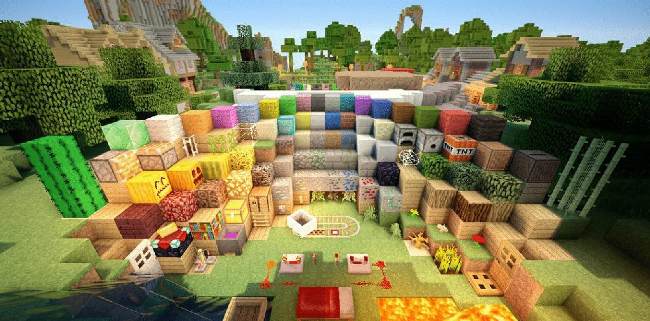
Для того, чтобы узнать текущее время в Майнкрафт, используя функцию F3, следуйте этим шагам:
1. Запустите Майнкрафт и загрузите мир, в котором вы хотите узнать текущее время.
2. Нажмите клавишу F3 на клавиатуре. Это откроет экран отладки.
3. Найдите раздел «XYZ», находящийся в верхней части экрана отладки.
4. В этом разделе найдите строку, которая начинается с «tm». Это означает «внутреннее время» (англ. «internal time»).
5. Рядом с «tm» вы увидите число, которое представляет текущее время в Майнкрафт. Это число может быть представлено как десятичная дробь, например, 3000.1. Это означает, что прошло 3000 игровых дней, и время находится между полуднем и закатом.
6. Если вы хотите узнать текущее время более точно, то найдите строку под названием «Daytime». Это число представляет текущее количество игровых тиков с момента начала игры. Для того, чтобы узнать текущее время, разделите это число на 24000 (количество игровых тиков в одном игровом дне). Например, если «Daytime» равно 12000, то это означает полдень.
7. После того, как вы узнали текущее время, нажмите клавишу F3 еще раз, чтобы закрыть экран отладки.
— Если вы играете на сервере, то время может быть установлено администратором и не соответствовать времени в реальном мире.
— Также вы можете узнать текущее время, используя команду /time в чате.
How to Query Time in Minecraft
This Minecraft tutorial explains how to use a command to query time in the game with screenshots and step-by-step instructions.
You can quickly and easily find out various time values in Minecraft using the /time command. This command lets you find out the number of days elapsed, the number of game ticks since dawn or the age of the Minecraft world.
Let’s explore how to use this cheat (game command).
Supported Platforms
The command to query the time is available in the following versions of Minecraft:
| Platform | Supported (Version*) |
|---|---|
 Java Edition (PC/Mac) Java Edition (PC/Mac) |
Yes (1.3.1) |
 Pocket Edition (PE) Pocket Edition (PE) |
Yes (0.16.0) |
 Xbox 360 Xbox 360 |
No |
 Xbox One Xbox One |
Yes (1.2) |
 PS3 PS3 |
No |
 PS4 PS4 |
Yes (1.14.0) |
 Wii U Wii U |
No |
 Nintendo Switch Nintendo Switch |
Yes (1.5.0) |
 Windows 10 Edition Windows 10 Edition |
Yes (0.16.0) |
 Education Edition Education Edition |
Yes |
* The version that it was added or removed, if applicable.
NOTE: Pocket Edition (PE), Xbox One, PS4, Nintendo Switch, and Windows 10 Edition are now called Bedrock Edition. We will continue to show them individually for version history.
Requirements
To run game commands in Minecraft, you have to turn cheats on in your world.
Query Time Command
- Java
- PE
- Xbox
- PS
- Nintendo
- Win10
- Edu
Query Time Command in Minecraft Java Edition (PC/Mac)
In Minecraft Java Edition (PC/Mac), the syntax to query the time using the /time command is:
Definitions
value is the time value to query. It can be one of the following:
Query Time Command in Minecraft Pocket Edition (PE)
In Minecraft Pocket Edition (PE), the syntax to query the time using the /time command is:
Definitions
- daytime returns the number of game ticks since dawn
- gametime returns the age of the Minecraft world in game ticks
- day returns the number of days elapsed in the game (each day is 24000 game ticks)
Query Time Command in Minecraft Xbox One Edition
In Minecraft Xbox One Edition, the syntax to query the time using the /time command is:
Definitions
- daytime returns the number of game ticks since dawn
- gametime returns the age of the Minecraft world in game ticks
- day returns the number of days elapsed in the game (each day is 24000 game ticks)
Query Time Command in Minecraft PS4 Edition
In Minecraft PS4 Edition, the syntax to query the time using the /time command is:
Definitions
- daytime returns the number of game ticks since dawn
- gametime returns the age of the Minecraft world in game ticks
- day returns the number of days elapsed in the game (each day is 24000 game ticks)
Query Time Command in Minecraft Nintendo Switch Edition
In Minecraft Nintendo Switch Edition, the syntax to query the time using the /time command is:
Definitions
- daytime returns the number of game ticks since dawn
- gametime returns the age of the Minecraft world in game ticks
- day returns the number of days elapsed in the game (each day is 24000 game ticks)
Query Time Command in Minecraft Windows 10 Edition
In Minecraft Windows 10 Edition, the syntax to query the time using the /time command is:
Definitions
- daytime returns the number of game ticks since dawn
- gametime returns the age of the Minecraft world in game ticks
- day returns the number of days elapsed in the game (each day is 24000 game ticks)
Query Time Command in Minecraft Education Edition
In Minecraft Education Edition, the syntax to query the time using the /time command is:
Definitions
- daytime returns the number of game ticks since dawn
- gametime returns the age of the Minecraft world in game ticks
- day returns the number of days elapsed in the game (each day is 24000 game ticks)
Examples
- Java
- PE
- Xbox
- PS
- Nintendo
- Win10
- Edu
Example in Java Edition (PC/Mac)
To query the number of days elapsed in the game in Minecraft Java Edition (PC/Mac):
To query the number of game ticks since dawn:
To query the age of the Minecraft world in game ticks:
Example in Pocket Edition (PE)
To query the number of days elapsed in the game in Minecraft PE:
To query the number of game ticks since dawn:
To query the age of the Minecraft world in game ticks:
Example in Xbox One Edition
To query the number of days elapsed in the game in Minecraft Xbox One Edition:
To query the number of game ticks since dawn:
To query the age of the Minecraft world in game ticks:
Example in PS4 Edition
To query the number of days elapsed in the game in Minecraft PS4 Edition:
To query the number of game ticks since dawn:
To query the age of the Minecraft world in game ticks:
Example in Nintendo Switch Edition
To query the number of days elapsed in the game in Minecraft Nintendo Switch Edition:
To query the number of game ticks since dawn:
To query the age of the Minecraft world in game ticks:
Example in Windows 10 Edition
To query the number of days elapsed in the game in Minecraft Windows 10 Edition:
To query the number of game ticks since dawn:
To query the age of the Minecraft world in game ticks:
Example in Education Edition
To query the number of days elapsed in the game in Minecraft Education Edition:
To query the number of game ticks since dawn:
To query the age of the Minecraft world in game ticks:
How to Enter the Command
1. Open the Chat Window
The easiest way to run a command in Minecraft is within the chat window. The game control to open the chat window depends on the version of Minecraft:
- For Java Edition (PC/Mac), press the T key to open the chat window.
- For Pocket Edition (PE), tap on the chat button at the top of the screen.
- For Xbox One, press the D-Pad (right) alt=»xbox one» width=»21″ height=»21″ />on the controller.
- For PS4, press the D-Pad (right) alt=»ps4″ width=»21″ height=»21″ />on the controller.
- For Nintendo Switch, press the right arrow button on the controller.
- For Windows 10 Edition, press the T key to open the chat window.
- For Education Edition, press the T key to open the chat window.
2. Type the Command
In this example, we have started a new game and we want to find the current game time (ie: age of the Minecraft world) with the following command:
Type the command in the chat window. As you are typing, you will see the command appear in the lower left corner of the game window. Press the Enter key to run the command.
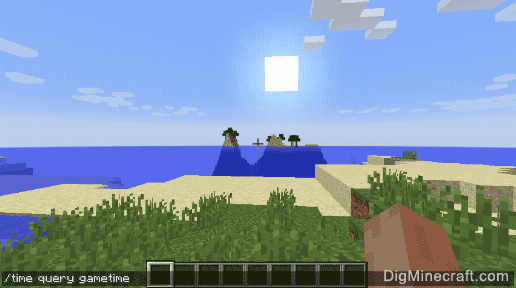
Once the cheat has been entered, the game will display the game time in the world.
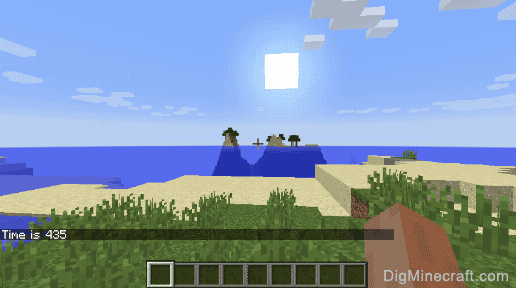
You will see the message " Time is xxx " appear in the lower left corner of the game window where xxx is the current game time.
TIP: Each day in Minecraft is a time value of 24000. If you want to know how many days you’ve been playing the game, divide the game time value by 24000 or try the /time query day command.
For example, a game time of 88398 would mean that 3.68325 days (88398/24000 = 3.68325) have passed in the game.
Congratulations, you just learned how to use the /time command to query the time in Minecraft!
Как изменить время?
Игроку может потребоваться изменить время в игре, для этого существует специализированная команда. С ее помощью можно сделать, как день, так и ночь. Это достаточно удобно, так как ночью можно встретиться с агрессивными мобами для получения опыта и ценного лута. В то же время, днем можно рассчитывать на спокойное выживание и развитие различных построек.

Команда /time
/time – команда, которая поможет изменить время в игре. С ее помощью можно добавить игровое время, установить определенное значение или запросить значение. Существует три параметра, которые описаны ниже.
- /time set [Значение] – Устанавливает заданный параметр.
- /time add [Значение] – Добавляет определенное количество тиков.
- /time query – Запрашивает значение игровых тиков для их дальнейшего изменения.
Значения для /time set
Команда может быть описана не только числом, но и текстом. Это удобно для быстрого выполнения.
| Значение | Текстовый ярлык | Расшифровка |
|---|---|---|
| 1000 | day | День |
| 6000 | noon | Полдень |
| 13000 | night | Ночь |
| 18000 | midnight | Полночь |
Как сделать день?
Команда /time set day – установит дневное время суток.

Как сделать ночь?
С помощью /time set night можно получить ночное время.

Как сделать утро?
/time set 0 – установка утреннего времени.

 Обрати внимание!
Предметы
→ Блоки
→ Ресурсы
→ Инструменты
→ Оружие
→ Броня
→ Руды
→ Еда
→ Транспорт
→ Механизмы
→ Пластинки
→ Растения
→ Спавнеры
→ Яйца спавна
→ Красители
 Мобы
Мобы
Жители
 Зачарования
  Зелья
Зелья
Команды
Достижения
Эффекты  Структуры
→ Биомы
→ Данжи
→ Миры
 Гайды
Гайды