Debug Stick Item ID
Each item in Minecraft has a unique ID assigned to it, known as an item ID, this can be used in commands to spawn the item into the game. The item ID for debug stick in Minecraft is shown below:
Debug Stick Spawn Command
The Debug Stick item can be spawned in Minecraft with the below command. Cheats must be enabled before this will work.
All Minecraft 1.18 Item IDs
Find thousands more items on our complete list of 1,325 Minecraft IDs.
Debug Stick Information

This item can be spawned in using its spawn commands that are found on this page. It can be used to edit block states — simply hit a block with it to cycle through blockstates, shifting and hitting a block will cycle through blockstates in reverse order.
How to Give a Debug Stick in Minecraft
This Minecraft tutorial explains how to craft a special item called a debug stick that looks a lot like an enchanted stick.
In Minecraft, a debug stick is an item that you can not make with a crafting table or furnace. Instead you need to use the cheat called the /give command to get this item in the game.

Let’s explore how to use cheats (game commands) to add a debug stick to your inventory.
Supported Platforms
The command to give a debug stick is available in the following versions of Minecraft:
| Platform | Supported (Version*) |
|---|---|
 Java Edition (PC/Mac) Java Edition (PC/Mac) |
Yes (1.13) |
 Pocket Edition (PE) Pocket Edition (PE) |
No |
 Xbox 360 Xbox 360 |
No |
 Xbox One Xbox One |
No |
 PS3 PS3 |
No |
 PS4 PS4 |
No |
 Wii U Wii U |
No |
 Nintendo Switch Nintendo Switch |
No |
 Windows 10 Edition Windows 10 Edition |
No |
 Education Edition Education Edition |
No |
* The version that it was added or removed, if applicable.
NOTE: Pocket Edition (PE), Xbox One, PS4, Nintendo Switch, and Windows 10 Edition are now called Bedrock Edition. We will continue to show them individually for version history.
Requirements
To run game commands in Minecraft, you have to turn cheats on in your world.
Give Debug Stick Command
- Java
Give Debug Stick Command in Minecraft Java Edition (PC/Mac)
In Minecraft Java Edition (PC/Mac), the syntax to give a player a debug stick using the /give command is:
Definitions
- player is the name of the player (or a target selector) that you wish to give the debug stick to.
- amount is optional. It is the number of debug sticks that you want to give. If you don’t specify an amount, the player will be given 1 debug stick.
Examples
- Java
Example in Java Edition (PC/Mac)
To give 1 debug stick to the player named DigMinecraft in Minecraft Java Edition (PC/Mac):
To give 1 debug stick to all players:
How to Enter the Command
1. Open the Chat Window
The easiest way to run a command in Minecraft is within the chat window. The game control to open the chat window depends on the version of Minecraft:
- For Java Edition (PC/Mac), press the T key to open the chat window.
2. Type the Command
In this example, we will give 1 debug stick to the player called DigMinecraft with the following command:
Type the command in the chat window. As you are typing, you will see the command appear in the lower left corner of the game window. Press the Enter key to run the command.
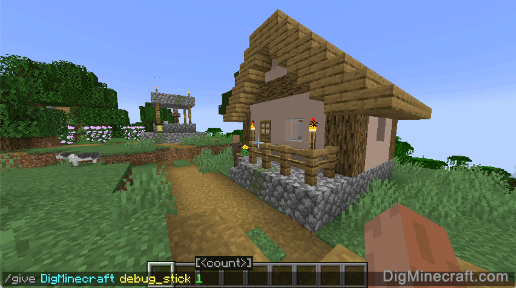
Once the cheat has been entered, the debug stick will be added to the player’s inventory.
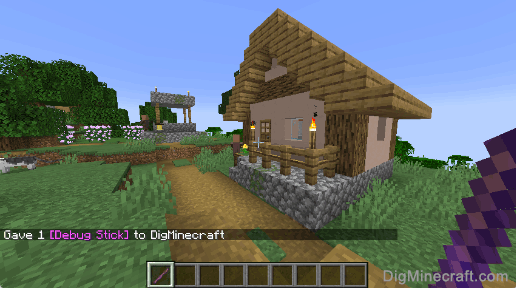
You will see the message " Gave 1 [Debug Stick] to DigMinecraft " appear in the lower left corner of the game window. You have now given 1 debug stick to the player called DigMinecraft.
Congratulations, you have learned how to craft a debug stick using the /give command in Minecraft.
Как вызвать палку отладки в майнкрафт — Сайт о Игре Minecraft
Как вызвать палку отладки в майнкрафт — Советы и Инструкции
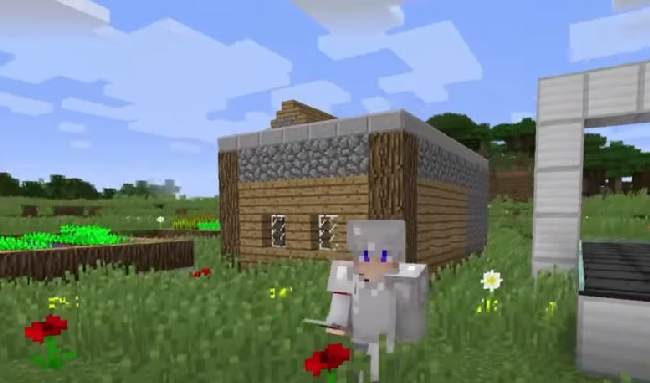
Чтобы вызвать палку отладки (debug stick) в Майнкрафте, необходимо выполнить следующие шаги:
1. Откройте игру Minecraft и выберите нужный мир.
2. Нажмите на клавишу «Е» на клавиатуре, чтобы открыть инвентарь.
3. В верхней строке инвентаря найдите место с надписью «Поиск» и введите туда «debug stick» или «палка отладки».
4. После того, как поиск найдет палку отладки, щелкните на нее левой кнопкой мыши, чтобы взять ее в руку.
— Палка отладки доступна только в Креативном режиме.
— С помощью палки отладки можно изменять различные свойства блоков и существ, например, их состояния или направления.
— При нажатии правой кнопки мыши на блоке или существе с помощью палки отладки откроется меню с настройками.
Как выдать палку отладки в майнкрафт?
 Друг! Не забывай, что мы платим до 10 рублей за каждый ответ. Выбирай игру, читай любой вопрос и пиши ответ. Платим каждую неделю на сотовый телефон или yoomoney (Яндекс Деньги). Правила здесь.
Для выдачи палки отладки в Minecraft необходимо открыть чат (клавиша «T» на клавиатуре) и ввести команду «/give [имя игрока] minecraft:debug_stick [количество]» (без кавычек), где вместо [имя игрока] нужно указать свой ник или ник другого игрока, а вместо [количество] можно указать количество палок отладки, которое нужно выдать (если значение не указано, по умолчанию будет выдана одна палка). Нажмите клавишу «Enter» для подтверждения команды и палка отладки появится в вашем инвентаре.
Для того чтобы выдать себе палку отладки (debug stick) в Minecraft, необходимо использовать команду /give.
Откройте чат в игре, нажмите клавишу «/» и введите команду:
/give <ваш ник> minecraft:debug_stick
Нажмите Enter, чтобы выполнить команду. После этого в ваш инвентарь будет добавлена палка отладки.
Обратите внимание, что для использования палки отладки вам может понадобиться право на использование команд в игре, которое можно получить, если вы являетесь администратором сервера или играете в одиночную игру в режиме «Мироздание» с включенными правами на использование команд.