How to Set Up and Use Biomes O’ Plenty Mod
This guide will properly show you how to set up and configure the Biomes O’ Plenty mod.
NOTE: The Biomes O’ Plenty is a mod so you need to be running a Forge server to be able to load it! Also, do not forget that mods and Forge need to be set up into your client as well as into the server. Here is our guide for installing mods into your client.
❓ What is Biomes O’ Plenty ❓
Biomes O’ Plenty is a mod that adds unique biomes to the Overworld and Nether. So basically, you can generate a custom world with many more biomes than before.
Please note that for the biomes that this mod contains to generate properly you need to create a new world after adding it, you will not be able to add it to an existing world.
This mod is working only for the following Minecraft versions:
You can find more information about this mod here on the official page if needed.
�� How to Set Up Biomes O’ Plenty Mod ��
To install the Biomes O’ Plenty mod into your server you need to do the following:
Download your wished Biomes O’ Plenty version here.

Upload the mods to your server mods folder. We highly recommend you to upload the mods through FileZilla.

⚠ NOTE ⚠: We highly recommend you to upload the Mod through FileZilla. You can find more about FileZilla here.
Restart your server.
Please note that we also have a guide for how to install mods on your server here.
�� How to Create a World Using Biomes O’ Plenty ��
To configure the Biomes O’ Plenty mod and create a world using it you need to do the following:
Log in to your Multicraft panel, stop your server and click on Create New .

Change just the World Name box to anything you want, like BiomesOP , and click on Create .

Go back to your Multicraft main page, click on Files , then on FTP files access and log in.
Click on server.settings file (inside the root directory of the server), then click on Edit .

Find and change the following line as you see below, then click on Save .
level-type=BIOMESOP — for 1.12.2 and lower versions
level-type=biomesoplenty — for 1.15 and higher versions

⚠ NOTE ⚠: For 1.15 and above, the level-type setting in server.properties must be set to biomesoplenty . For 1.12.2 and below, set level-type in server.properties to BIOMESOP .
Start the server.
Now you just generated a Biomes O’ Plenty world.
If you have any issues setting up Biomes O’ Plenty into your server please contact us on live chat or via the ticket system.
How to use biomes o plenty on a server?
Go to «Game Settings» page on your server panel and select the «World» tab. Once on this page you should be able to see the World Type dropdown menu. If your server’s game version is 1.15 or higher then select Forge: Biomes ‘O Plenty (1.15+) which will change your World Type to be biomesoplenty .
How do I use biomes o plenty on a Aternos server?
First, you have to switch your server to the forge server software (https://aternos.org/software/forge/). You can then generate a Biomes O’ Plenty world for your server. MINECRAFT 1.12. 2 and older: Type «BIOMESOP» into the worldtype field.
How do I use biomes o plenty?
- Step 1) Download & Install Forge. .
- Step 2) Download Biomes O’ Plenty. .
- Step 3) Install Biomes O’ Plenty. .
- Step 4) Open The Minecraft Launcher & Select The ‘Forge’ Profile. .
- Step 5) Have Fun & Enjoy Biomes O’ Plenty.
What is the rarest biome in biomes o plenty?
Rainbow Hills; or Rainbow Valley prior to 1.16. 3-12.0. 0.404; is the rarest island biome. It has almost every type of flower from both Vanilla and Biomes O’ Plenty, excluding swamp and tropical themed flowers.
Does biomes o plenty work with fabric?
Biomes O’ Plenty is now a closed source mod, licensed as All Rights Reserved for 1.17.1 and all future versions. . And no, you are not allowed to port the mod to Fabric or any other modloader.
How to get Biomes O' Plenty to work on multiplayer (All Versions)
32 related questions found
What is the biomes O Plenty world type?
Biomes O’ Plenty is a mod which introduces 80 new biomes and 12 sub-biomes to the game, many of which have new blocks, mobs and biome-specific plants compared to vanilla world. To create a world with Biomes O’ Plenty biomes, world type «Biomes O’ Plenty» should be selected instead of «Standard», «Superflat», etc.
How do I enable biomes O Plenty single player?
New Member. FTB Launcher> FTB Unleashed> Edit mod pack. Click Biomes O’ Plenty and then click add. Now launch FTB Unleashed.
How do I turn off biomes o plenty biomes?
Go to . minecraft\config\biomesoplenty and open biomes. json and try setting «weight» to 0 or -1.
How do I change the level of my minecraft server?
- Stop your server. .
- In your Multicraft Control Panel, navigate to Files > Config Files.
- On the Config Files page, select Server Settings.
- Locate the option called level-type and enter the level type you want: DEFAULT, FLAT, LARGEBIOMES, or AMPLIFIED.
What biomes are added in biomes o plenty?
Nether Biomes are Added!
People have been waiting over a year for the Nether Biomes to be readded to Biomes O’ Plenty! And they are finally here!
What is in biomes o plenty?
Biomes o’ Plenty is a worldgen mod by TDWP_FTW, ted80, Amnet, and Adubbz that adds 80 new biomes and 12 sub-biomes, new gems and a whole new dimension. It also new armor, plants, food and tools to the game. This mod is not only focused on realistic biomes; there are fantasy biomes. Examples are Fungi Forest and Garden.
Is the biomes o plenty mod free?
Biomes O’ Plenty is available for free on CurseForge. Players can download the mod from here. Since this is a forge mod, players have to download forge client to play this mod.
What is the rarest biome in Minecraft?
Modified Jungle Edge
This is the rarest biome in Minecraft as stated by their developers. This biome gets the “extremely rare” tag. The reason for its rarity is the conditions that it needs to spawn. A Swamp Hills biome is required to generate beside the Jungle biome.
Why can't I find biomes in biomes o plenty?
Numbers 0-39 are all vanilla biomes. If it says «Could Not Find Biome [biomename]!» as an error message in chat, that means that there is none of the biome you want within 10,000 blocks of you. . In 1.8, you used to be able to type the biome’s name instead, but since 1.9 it is now the biome’s ID.
Is there a command to find biomes?
In Minecraft, /locatebiome is a new command that was introduced in the Nether Update. Use the /locatebiome command to easily find a biome in any of the 3 dimensions (Overworld, Nether and End).
How many biomes are in biomes o plenty?
Biomes O’ Plenty is a mod which introduces 80 new biomes and 12 sub-biomes to the game, many of which have new blocks, mobs and biome-specific plants compared to vanilla world.
Sorry, you have been blocked
This website is using a security service to protect itself from online attacks. The action you just performed triggered the security solution. There are several actions that could trigger this block including submitting a certain word or phrase, a SQL command or malformed data.
What can I do to resolve this?
You can email the site owner to let them know you were blocked. Please include what you were doing when this page came up and the Cloudflare Ray ID found at the bottom of this page.
Cloudflare Ray ID: 7ea358a44cc43267 • Your IP: Click to reveal 178.132.110.79 • Performance & security by Cloudflare
How to Create a Biomes O' Plenty World for Your Minecraft Server
Biomes O' Plenty is a Forge mod that adds over 50 additional biomes to Minecraft. This guide will explain how to set up your server with this mod so that you can enjoy these biomes in a brand new Minecraft world.
Install the Mod
To use Biomes O' Plenty on your dedicated server you will need to have either a modpack installed or have installed Forge onto your server.
Modpacks
Not all modpacks will include Biomes O' Plenty on their mod list, so before we make any changes to the server we need to confirm if the mod jar is included in the pack.
Click on the File Manager on the server panel
Click on the folder named mods . This folder will contain all of the mods currently on your server.
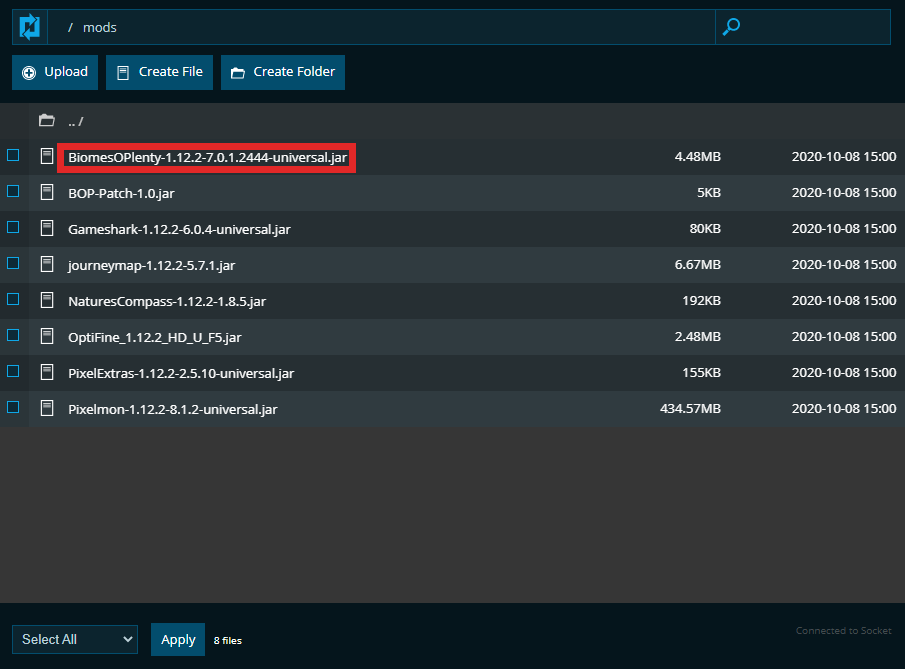
Look through the list of jar files in here or search the File Manager in the top right, and find the jar file beginning with BiomesOPlenty . This jar file will have an associated Minecraft game version and a mod version.
For example the modpack of Pixelmon from ATLauncher includes Biomes O' Plenty with game version 1.12.2 and mod version 7.0.1.2444 .
Manual Install
To add this mod to your server manually go to the Biomes O' Plenty CurseForge site and download one of the jar files from there. When choosing which jar file for the server, here are a couple things to consider.
The jar file should match the general syntax as described above. BiomesOPlenty-GameVersion-ModVersion
The game version of the mod should match your server's game version. i.e. Biomes O' Plenty 1.15.2 will not work on a 1.12.2 server.
Once you have selected which mod jar you want download the file to your computer and then upload it to the mods folder on your server.
Change World Generation
To have Biomes O' Plenty enabled we will need to change how the server is generating a new world. That can be done in two separate places on your Nodecraft server.
Game Settings
Go to "Game Settings" page on your server panel and select the "World" tab. Once on this page you should be able to see the World Type dropdown menu.

If your server's game version is 1.15 or higher then select Forge: Biomes 'O Plenty (1.15+) which will change your World Type to be biomesoplenty . If your server's game version is below 1.15 then select Forge: Biomes 'O Plenty , which will change your World Type to be BIOMESOP .
Once you have selected the correct World Type for your server make sure to save your changes at the bottom of the page.
server.properties File
To manually change the World Type for your server go to your File Manager and locate the server.properties file. Click on it, then select the "edit" button. Find the line level-type and change the value there to either be:
biomesoplenty for 1.15 and above
BIOMESOP for 1.12.2 and below
Generate a New World
Now that the server's world generation has been changed and Biomes O' Plenty has been installed you can now generate your Biomes O' Plenty world. If you have not generated a world already on the server you can simply start your server and a new world will begin generating. Otherwise you will either need to delete your previous world or create a new one in Game Settings under the World tab.