Не отвечает сервер? Как пинговать сервер Minecraft
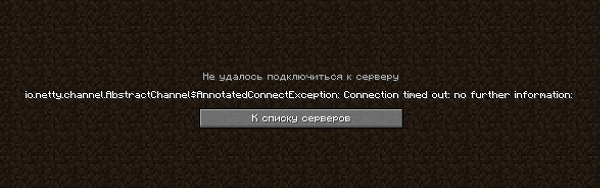
Бывают случаи, когда при входе на сервер, вы получаете ошибку «Io.netty.channel.AbstractChannel$AnnotatedConnectException: Connection time out: no further information«, которая означает, что ваш компьютер не смог получить информацию о сервере, IP которого вы использовали для входа. В этой статье, вы узнаете, как с помощью стандартных средств системы, проверить доступность любого IP или сервера.
Пинг на Windows
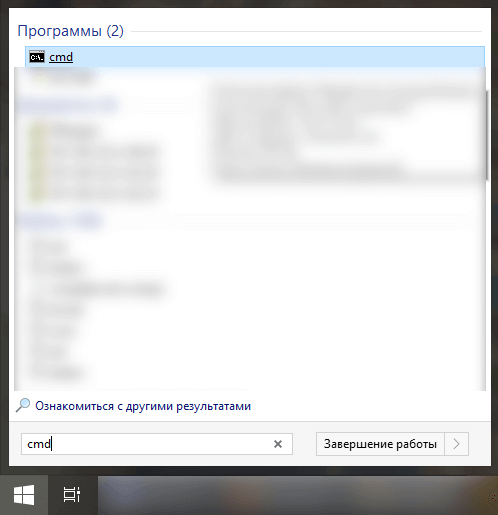
На компьютере, с которого пытаетесь подключится к серверу, открываем Пуск и вписываем в поиск cmd (Если поиска нет, нажимаем клавиши Windows+R и вписываем в окне CMD, нажимаем ОК), открываем данную программу:
В открывшемся окне вписываем ping -4 10.10.10.10, где вместо 10.10.10.10, адрес сервера (в буквенном виде, например, mc.test.ru) или IP (состоящий из цифр), нажимаем Enter.
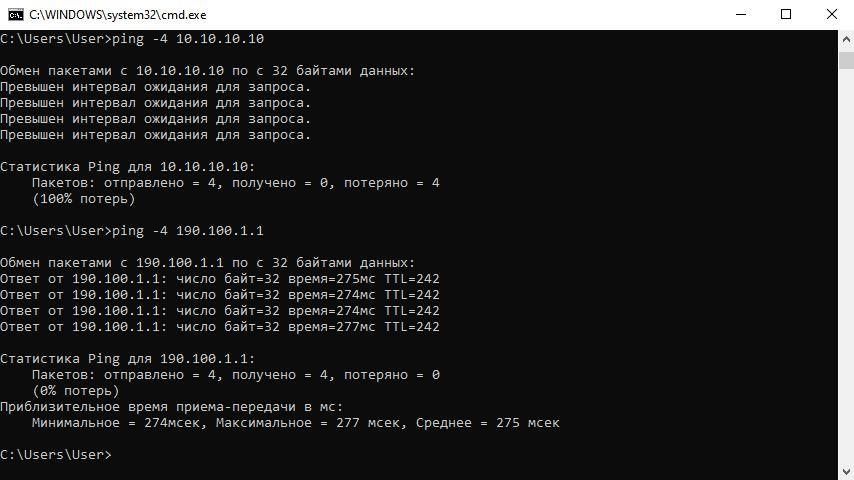
Превышен интервал ожидания для запроса: При таком ответе, ваш компьютер НЕ МОЖЕТ пропинговать сервер, с большой вероятностью настройка сети выполнена не верно (если речь про локальную сеть) или же сервер физически не работает.
Ответ от 190.100.1.1: число байт=32 время=275мс TTL=242: Значит сеть настроена верно, у вас должна быть возможность войти на сервер. Если всё равно не входит с такой ошибкой, нужно искать причину в антивирусе или брандмауэре.
Пинг на macOS
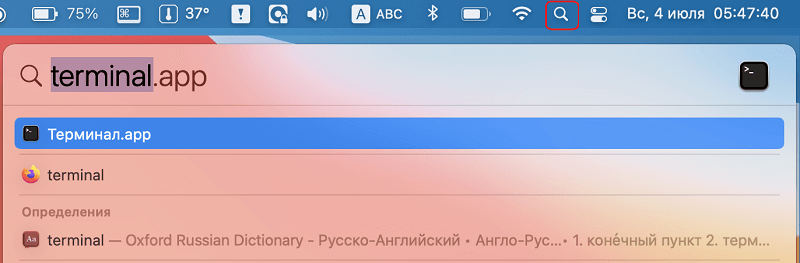
Для проверки пинга сервера, открываем Терминал (Terminal). Для его открытия, можно нажать на иконку поиска (или нажать клавиши Command+P) и вписать название этой программы. Открываем её.
В открывшемся окне вписываем ping -c 4 10.10.10.10, где вместо 10.10.10.10, адрес сервера (в буквенном виде, например, mc.test.ru) или IP (состоящий из цифр), нажимаем Enter.
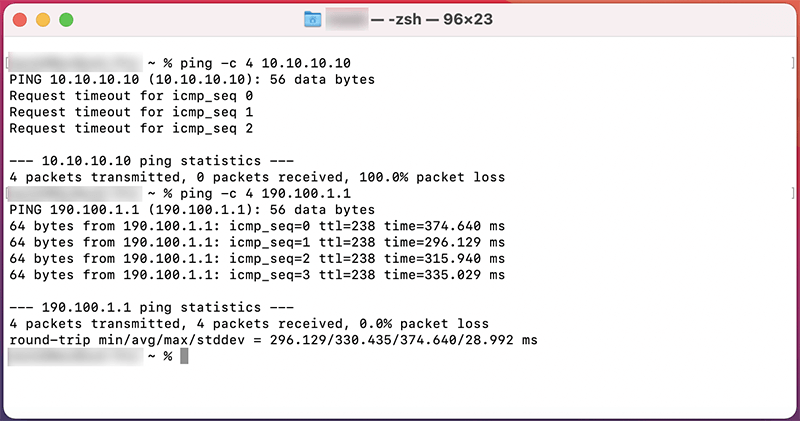
Request timeout for icmp_seq 0: При таком ответе, ваш компьютер НЕ МОЖЕТ пропинговать сервер, с большой вероятностью настройка сети выполнена не верно (если речь про локальную сеть) или же сервер физически не работает.
64 bytes from 190.100.1.1: icmp_seq=1 ttl=238 time=374.640 ms: Значит сеть настроена верно, у вас должна быть возможность войти на сервер. Если всё равно не входит с такой ошибкой, нужно искать причину в антивирусе или брандмауэре.
Minecraft Server Status
mcstatus.io is an online tool for retrieving the status of any Java Edition or Bedrock Edition Minecraft server. We also offer an API for developers to programmatically retrieve the status of Minecraft servers, with a very lenient cache duration of only 1 minute. This service was inspired by mcsrvstat.us but built from the ground up with speed and reliability in mind. While working with other existing services, I realized the many missing features that developers could use which inspired me to start my own service. To this day, we serve an average of 50K unique users and over 500,000 requests per month.
Some of our competitors use unnecessarily long cache times, meaning it could take up to 5 minutes to get the up-to-date status of any server you requested. This duration was entirely unnecessary, which is why we only cache statuses for up to 1 minute from the last retrieval. We also offer many features that our competitors do not, such as formatting options for the MOTD, version name, and sample player names. This allows you to embed this information on your website exactly as you see it in-game.
In addition to just retrieving the Minecraft server status, we also use the query protocol for Java Edition servers, allowing us to get extra information about the servers like plugins and software information. While statuses are our main focus, we also offer additional routes like retrieving an server icon and a generated status widget. The icon route allows you to embed your server's icon directly into your website without ever having to worry about updating it, and the widget route shows your users a preview of your server without them having to open the game.
Our API is built from the ground up using Go — a high performance programming language — and we directly communicate with the Minecraft server using the official networking protocol. We also utilize Redis to store and retrieve cached statuses extremely fast. All of our services are open source, and available for you to view on our GitHub organization. If you would like to implement our API into your service, head over to the API documentation page to read up on the API routes.
Real -time Minecraft server status and data checker
Get information about your favourite Minecraft server for Java or Bedrock edition!
Just looking? Try out these sample servers!
Your.server.com! Add it in a couple of seconds!
Discord bot
Is Minecraft Server Online bot
What is it?
Is Minecraft Server Online bot is a Discord bot, which allows you to check any Minecraft server status directly on Discord! It also allows you to enable livecheck and it will check your server status every 15 seconds completely for free!
How to use it?
To use the bot, you need to invite it to your server. You can do it by clicking the "Invite" button above. After that, you can use the bot by using the /slash commands . You can also use the web dashboard by clicking the "Web dashboard" button above.
How to use this tool?
Simply enter the server address you want to check in input and click Search button. The fetching state shouldn't take more than 5 seconds. After that, you will see the server status, including the server version, player count, and maximum player count. If the server is online, you can then click the big domain text to view the website in new browser tab. The website may also provide additional information about the server, such as a players list, host, software and plugins used. Use this tool to easily check the status of your favorite Minecraft servers and quickly join the ones that are online.
How does it work?
Real-time information about a Minecraft server is fetched and shown on a website that checks the status of servers. Most websites have a feature that lets you enter the hostname or address of the server to get information about its current status. The typical method of getting this information is to send a request to the server and then wait for a response. The response often includes details on the server's version, the total number of players it can support, and the number of people who are online right now. It is then simple for you to establish whether the server is active and open for you to join thanks to the website's clear and concise display of this information for you.
Hardly using Discord? We got you covered!
With the Minecraft server status Discord bot, checking the status of your favorite Minecraft servers has never been easier. All you need to do is hop into your Discord channel and type in the /status command followed by the server's address or hostname. In just a matter of seconds, the bot will fetch all the information about the server's current status for you. You'll be able to see the server version, the number of players online, and the maximum number of players the server can handle and motd. No more switching between different platforms or navigating through complex websites. Just type in the command and get all the information you need, right there in your Discord channel. /livecheck command updates server online status and player count automatically every 15 seconds and updates the message if changes occur. Stay updated on your favorite Minecraft server in real-time.
Find your new favourite
Explore over 2 thousand available servers in our database with our popular-servers route! Our database contains the most played servers from around the world, ensuring that you'll find the most popular and exciting servers to join. Whether you're looking for a new community to join or a new challenge to take on, our popular servers route has got you covered. So start exploring now and join in on the fun!
Minecraft Server Status Checker
Minecraft Server Status Checker tool allows users to check the availability and status of Minecraft game servers. You will be able to find out whether the server is online or offline, active playes count and version of Minecraft supported.
How Minecraft Server Status Checker works ?
A Minecraft Server Status Checker works by connecting to a Minecraft server and retrieving information about its current status. This is typically done using the Minecraft server’s IP address and a query port, which is used to communicate with the server. Once connected, the checker will send a request for information, such as the server’s status, player count, and ping. The server will then respond with this information, which the checker will display to the user. The checker may also periodically check the status of the server and update the information displayed to the user in real-time.
It’s important to note that some checkers are built to only check a server’s availability and some other checkers can check for more information such as the number of players on the server, the server version, the motd and so on.
In addition, Some checkers also provide additional features such as the ability to sort servers by certain criteria, or even allow players to vote for their favorite servers, which can help other players find good servers to play on.
Best Minecraft Servers
Minecraft servers are online communities where players can join to play and interact with other Minecraft enthusiasts. The best Minecraft servers offer a wide variety of game modes, from survival and creative to mini-games and roleplay, each with their unique gameplay mechanics and rules.
These servers often have active and engaged communities, with players from all over the world, creating a vibrant and dynamic experience. The best Minecraft servers typically have well-designed maps and custom plugins, which enhance the overall gameplay experience. They also have active moderators and staff members who ensure the smooth functioning of the server and maintain a safe and welcoming environment for players of all ages.
Overall, the best Minecraft servers provide a fun, social, and engaging experience for players, with endless opportunities for exploration, creativity, and competition. In case you are looking for some good servers to play Minecraft online, here is a list of soe of the best servers available:
Minecraft Survival:
- Hypixel — IP: mc.hypixel.net
- Mineplex — IP: us.mineplex.com
- Cubecraft — IP: play.cubecraft.net
- The Hive — IP: play.hivemc.com
- Hermitcraft — IP: hermitcraft.com
Minecraft Creative:
- Minecade — IP: play.mineca.de
- TheArchon — IP: thearchon.net
- Mithrintia — IP: mithrintia.com
- CityCraft — IP: play.citycraft.net
- TheNodeMC — IP: play.thenodemc.com
Minecraft Mini-games:
- Hypixel — IP: mc.hypixel.net
- Mineplex — IP: us.mineplex.com
- The Hive — IP: play.hivemc.com
- CubeCraft — IP: play.cubecraft.net
- TheArchon — IP: thearchon.net
Minecraft Roleplay:
- Wynncraft — IP: play.wynncraft.com
- MCCentral — IP: mccentral.org
- PirateCraft — IP: mc.piratemc.com
- UniverseMC — IP: play.universemc.us
- GrandTheftMinecart — IP: mc-gtm.net
LEGAL DISCLAIMER
THE INFORMATION ON THIS PAGE IS STRICTLY FOR INFORMATIONAL PURPOSES ONLY. IT SHALL NEVER BE USED AGAINST ANY OF THE HOSTS WITHOUT PRIOR WRITTEN AND EXPLICIT PERMISSION FROM THE RESPECTIVE OWNERS. IT IS YOUR RESPONSIBILITY TO OBEY ALL APPLICABLE LOCAL, STATE AND FEDERAL LAWS. WE ASSUME NO LIABILITY AND ARE NOT RESPONSIBLE FOR ANY MISUSE OR DAMAGE CAUSED BY THE USE OF THE INFORMATION ON THIS PAGE.