[Гайд] Команда /replaceitem и её возможности
![[Гайд] Команда /replaceitem и её возможности](https://ru-minecraft.ru/uploads/posts/2014-06/1403869523_bez-imeni-3.jpg)
Итак, в снапшотах версии 1.8 было добавлено очень много команд, упрощающих создание карт на прохождение. К этим командам относится и /replaceitem. Данная команда предназначена для изменения предметов, находящихся в различных контейнерах. Давайте для начала рассмотрим синтаксис самой команды.
Синтаксис команды /replaceitem:
/replaceitem <Режим>[X] [Y] [Z] <Слот> <Предмет>[Количество] [дополнительныеПараметры] [NBTТеги]
Данная команда имеет два режима работы — block и entity. Сегодня мы рассмотрим первый — block, предназначенный для изменения предметов в контейнерах.
Каким образом следует передавать параметры команде /replaceitem?
Команда /replaceitem требует передавать параметр, отвечающий за слот, только в следующем виде — slot.container.*, где звёздочка — нужный нам слот. Остальные параметры передаются как обычно. Например, для указания блока используется его алфавитное название (Конструкция minecraft:stone, будет обозначать камень, minecraft:air — воздух, а minecraft:redstone_block — блок из красного камня).
Чем данная команда отличается от команды /blockdata?
Команда /blockdata нужна, когда требуется изменить параметры сразу нескольких слотов. Хотя её при желании можно использовать вместо команды /replaceitem, рекомендуется этого не делать. Тем более, рассматриваемая в данном уроке команда имеет намного более понятный для рядового пользователя синтаксис. Всё просто — не надо указывать NBT параметры, отвечающие за слоты, которые требуется изменить. Нужно просто указать слот вместо звёздочки в конструкции slot.container.*. Также, если использовать второй режим работы данной команды, можно изменить инвентарь любой сущности, чего с помощью команды /blockdata добиться не выйдет.
Также, не стоит забывать, что команда /replaceitem была добавлена в версии 1.8 (Снапшоты)
Команды консоли/replaceitem
Заменяет предмет в инвентаре блока или сущности на указанный.
- Java Edition
- Bedrock Edition
-
, раздатчики, выбрасыватели, воронки и сундуки-ловушки начинают нумерацию с нуля с верхней левой ячейки, номер увеличивается сначала горизонтально, затем вертикально. начинает нумерацию с нуля с нижней левой ячейки, номер увеличивается слева направо, 3 — верхняя ячейка для ингредиента, 4 — левая верхняя ячейка для огненного порошка.
- Нумерация ячеек печи: 0 — вход, 1 — топливо, 2 — выходной продукт.
container.26 minecraft:spruce_sapling 4 [ только для Java Edition ] replaceitem block
How to Use the ReplaceItem Command in Minecraft
This Minecraft tutorial explains how to use the /replaceitem command with screenshots and step-by-step instructions.
You can use the /replaceitem command to instanty replace one item with another item. You can replace armor items worn, weapons held in your hands, items stored in chests and items in your inventory/hotbar. This is a great way to quickly put armor on a player during a Minecraft battle or change out a worn out weapon.
Let’s explore how to use this cheat (game command).
Supported Platforms
The /replaceitem command is available in the following versions of Minecraft:
| Platform | Supported (Version*) |
|---|---|
 Java Edition (PC/Mac) Java Edition (PC/Mac) |
Yes (1.8), but removed in (1.17) |
 Pocket Edition (PE) Pocket Edition (PE) |
Yes (1.0.5) |
 Xbox 360 Xbox 360 |
No |
 Xbox One Xbox One |
Yes (1.2) |
 PS3 PS3 |
No |
 PS4 PS4 |
Yes (1.14.0) |
 Wii U Wii U |
No |
 Nintendo Switch Nintendo Switch |
Yes (1.5.0) |
 Windows 10 Edition Windows 10 Edition |
Yes (1.0.5) |
 Education Edition Education Edition |
Yes (1.0.18) |
* The version that it was added or removed, if applicable.
NOTE: Pocket Edition (PE), Xbox One, PS4, Nintendo Switch, and Windows 10 Edition are now called Bedrock Edition. We will continue to show them individually for version history.
Requirements
To run game commands in Minecraft, you have to turn cheats on in your world.
ReplaceItem Command
- Java
- PE
- Xbox
- PS
- Nintendo
- Win10
- Edu
ReplaceItem Command in Minecraft Java Edition (PC/Mac)
In Minecraft Java Edition (PC/Mac) 1.13, 1.14, 1.15 and 1.16, the /replaceitem command has different syntaxes depending on what you would like to do.
To replace a block with another item:
To replace an entity’s item with another item:
In Minecraft Java Edition (PC/Mac) 1.8, 1.9, 1.10, 1.11 and 1.12, the /replaceitem command has different syntaxes depending on what you would like to do.
To replace a block with another item:
To replace an entity’s item with another item:
Definitions
- pos or x y z is the x y z coordinate of the block to replace.
- target or targets is the name of the player (or a target selector) that you wish to replace an item for.
slot is the type of slot and slot number that you wish to replace the item for. It can be one of the following (Note: the first column in the table shows the slot value in Java Edition 1.13 and the second column shows the slot value in Java Edition 1.8-1.12):
ReplaceItem Command in Minecraft Pocket Edition (PE)
In Minecraft Pocket Edition (PE), the /replaceitem command has different syntaxes depending on what you would like to do.
To replace a block with another item:
To replace an entity’s item with another item:
Definitions
- position is the x y z coordinate of the block to replace.
- target is the name of the player (or a target selector) that you wish to replace an item for.
slotType and slotId determine the type of slot and slot number that you wish to replace the item for. It can be one of the following:
ReplaceItem Command in Minecraft Xbox One Edition
In Minecraft Xbox One Edition, the /replaceitem command has different syntaxes depending on what you would like to do.
To replace a block with another item:
To replace an entity’s item with another item:
Definitions
- position is the x y z coordinate of the block to replace.
- target is the name of the player (or a target selector) that you wish to replace an item for.
slotType and slotId determine the type of slot and slot number that you wish to replace the item for. It can be one of the following:
ReplaceItem Command in Minecraft PS4 Edition
In Minecraft PS4 Edition, the /replaceitem command has different syntaxes depending on what you would like to do.
To replace a block with another item:
To replace an entity’s item with another item:
Definitions
- position is the x y z coordinate of the block to replace.
- target is the name of the player (or a target selector) that you wish to replace an item for.
slotType and slotId determine the type of slot and slot number that you wish to replace the item for. It can be one of the following:
ReplaceItem Command in Minecraft Nintendo Switch Edition
In Minecraft Nintendo Switch Edition, the /replaceitem command has different syntaxes depending on what you would like to do.
To replace a block with another item:
To replace an entity’s item with another item:
Definitions
- position is the x y z coordinate of the block to replace.
- target is the name of the player (or a target selector) that you wish to replace an item for.
slotType and slotId determine the type of slot and slot number that you wish to replace the item for. It can be one of the following:
ReplaceItem Command in Minecraft Windows 10 Edition
In Minecraft Windows 10 Edition, the /replaceitem command has different syntaxes depending on what you would like to do.
To replace a block with another item:
To replace an entity’s item with another item:
Definitions
- position is the x y z coordinate of the block to replace.
- target is the name of the player (or a target selector) that you wish to replace an item for.
slotType and slotId determine the type of slot and slot number that you wish to replace the item for. It can be one of the following:
ReplaceItem Command in Minecraft Education Edition
In Minecraft Education Edition, the /replaceitem command has different syntaxes depending on what you would like to do.
To replace a block with another item:
To replace an entity’s item with another item:
Definitions
- position is the x y z coordinate of the block to replace.
- target is the name of the player (or a target selector) that you wish to replace an item for.
slotType and slotId determine the type of slot and slot number that you wish to replace the item for. It can be one of the following:
Examples
- Java
- PE
- Xbox
- PS
- Nintendo
- Win10
- Edu
Example in Java Edition (PC/Mac) 1.13, 1.14, 1.15 and 1.16
(NOTE: use the /item command instead for Java Edition 1.17 and higher)
To replace the head armor item with an iron helmet for the player called DigMinecraft:
To put a saddle on all donkeys:
To replace the weapon in the main hand of all drowned with a trident:
To put a diamond_pickaxe in the first slot of a chest (the chest is directly below you):
Example in Java Edition (PC/Mac) 1.11 and 1.12
To replace the chest armor item with a diamond chestplate for the player called DigMinecraft:
To put a saddle on all mules:
To replace the weapon in the main hand of all zombies with a feather:
To put iron boots in the first slot of a chest (the chest is directly below you):
Example in Pocket Edition (PE)
To replace the chest armor item with a diamond chestplate for the player called DigMinecraft:
To put a diamond sword in the third slot of a chest that is located at the coordinates (22, 64, 36):
Example in Xbox One Edition
To replace the feet armor item with diamond boots for the player called DigMinecraft:
To put a trident in the seventh slot of a chest that is located at the coordinates (4, 68, 123):
Example in PS4 Edition
To replace the chest armor item with a golden chestplate for the player called DigMinecraft:
To put a honey bottle in the third slot of a chest that is located at the coordinates (19, 65, -10):
Example in Nintendo Switch Edition
To replace the head armor item with an iron helmet for the player called DigMinecraft:
To put an iron pickaxe in the first slot of a chest that is located at the coordinates (-12, 70, 5):
Example in Windows 10 Edition
To replace the item in the third slot of the hotbar with a golden pickaxe for all players:
To put an iron sword in the second slot of a chest that is located at the coordinates (8, 69, 22):
Example in Education Edition
To replace the item in the sixth slot of the hotbar with a golden pickaxe for all players:
To put a diamond chestplate in the first slot of an enderchest that is located at the coordinates (208, 69, 41):
How to Enter the Command
1. Open the Chat Window
The easiest way to run a command in Minecraft is within the chat window. The game control to open the chat window depends on the version of Minecraft:
- For Java Edition (PC/Mac), press the T key to open the chat window.
- For Pocket Edition (PE), tap on the chat button at the top of the screen.
- For Xbox One, press the D-Pad (right) alt=»xbox one» width=»21″ height=»21″ />on the controller.
- For PS4, press the D-Pad (right) alt=»ps4″ width=»21″ height=»21″ />on the controller.
- For Nintendo Switch, press the right arrow button on the controller.
- For Windows 10 Edition, press the T key to open the chat window.
- For Education Edition, press the T key to open the chat window.
2. Type the Command
In this example, we are going to equip a diamond chestplate on the player called DigMinecraft with the following command:
Type the command in the chat window and press the Enter key to run the command.
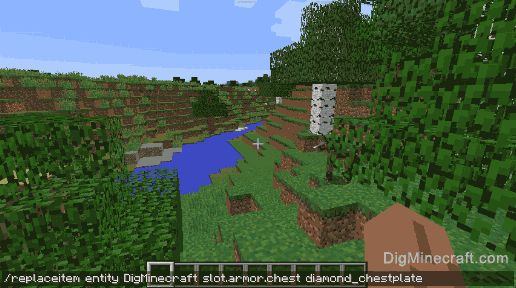
Once the cheat has been entered, the item will be replaced.
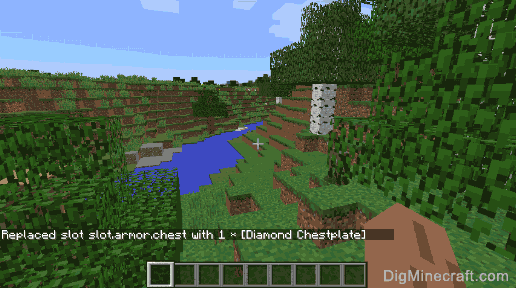
Once you have entered the command, you will see the message " Replaced slot slot.armor.chest with 1 x [Diamond Chestplate] " appear in the lower left corner of the game window. This indicates that that slot has been replaced with a diamond chestplate.
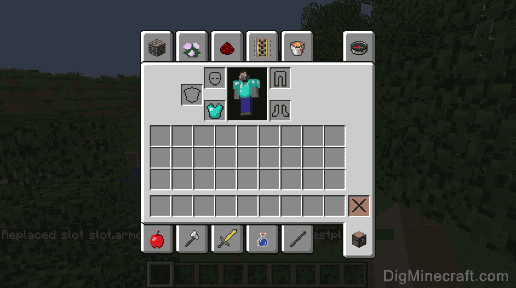
As you can see, the diamond chesplate is now being worn by DigMinecraft.
Congratulations, you have learned how to use the /replaceitem command in Minecraft.
Commands/replaceitem
Specifies the position of the block to be modified. Must be a three-dimensional coordinates composed of <x>, <y> and <z>, each of which must be a floating-point number or tilde and caret notation.
Specifies one or more entities to modify. Must be a player name or a target selector.
slotType: EntityEquipmentSlot : enum, slot.container and <slotId: int> : int
Specifies the inventory slot to be modified. Valid values depend on whether a block or an entity is being modified. See Slot for details. slotId: int must be a 32-bit integer number. And it must be between -2147483648 and 2147483647 (inclusive).
Specifies the item to be placed in the block or entity’s inventory slot.
Specifies the number of items to be placed in the block or entity’s inventory slot. Must be a 32-bit integer number. And it should be between 1 and 64 (inclusive).
Specifies the item data for the item(s) to be placed in the block or entity’s inventory slot. Values which are invalid for the specified item id will default to 0. If not specified, defaults to 0. Must be a 32-bit integer number. It must be between -2147483648 and 2147483647 (inclusive).
Specifies the item components. Like data tags but supports only minecraft:can_place_on , minecraft:can_destroy , minecraft:item_lock , and minecraft:keep_on_death functions (see Commands/give#Examples) Must be a JSON Object.
Must be one of: destroy — Directly replaces items ignoring the original items in the specified slot. keep — Does not replace items if an item occupies that slot.