How To Install Optifine In Minecraft Java Edition (Pojav Launcher) Android || Fix Lag On PojavLauncher
So, guys in this article I’m going to share with you that how you can Install optifine in minecraft java edition android (PojavLauncher) In 2021. So, optifine is used to reduce the lag with hd graphics and you guys already knew that pojav launcher has a big problem of lagging, so this issue is very common in each kne of you so, I would like to share the optifine with best settings of pojav Launcher to reduce lag issue in Minecraft Java (PojavLauncher) so, must read this article fully and carefully, if you didn’t get what I’m saying then kindly read it again you’ll definitely understand.
I know that you guys like minecraft Java edition of Android which can be played through PojavLauncher but pojav launcher usually lags and the lag problem is very big because it can’t be played with that much lag so, without using this optifine and settings no one can play the game so, this OPTIFINE and settings are necessary to play pojavlauncher. This Optifine Is working on Latest version so, you can play it with latest version with hd graphics. So, the experience of playing the game will increase x100. So, Definitely use it.
Some Information About Game :
So, Guys Minecraft Is very popular game and it’s available on Play Store and it’s Named Minecraft Pocket Edition. But people’s seeing their favorite YouTuber. And YouTubers mostly plays in PC and the PC Version Of This Minecraft Game Is Minecraft Java Edition So, Everyone wants to play the minecraft Java edition which is pc version but people’s want it, then after seeing the audience the unofficial Minecraft Java Edition Launcher LAUNCHED whose name is Pojav Launcher And It You Help you to play minecraft Java edition on android mobile. So, This unofficial Minecraft Java edition is only offline game but we can play online through only one method which is To Buy An Account. And if we buy a account then we can play the online minecraft Java edition where we can play in servers, multiplayer and many more. So, this game is free but only for offline. This pojavlauncher is not only the Launcher which helps to play minecraft Java edition on android an another Launcher is there which can help you to launch minecraft Java edition whose name is mchinbox I think I’ve done any spelling mistake but doesn’t matter so, this is also a Launcher which will help us to launch minecraft Java edition on android, it’s also good and have same conditions like pojavlauncher but the controllers are different but the experience is same. So, this was the information about the minecraft Java edition launcher pojav launcher.
1. So, firstly click on the Download button given below so, after clicking you’ll be redirected to my official website where you have to search » optifine on pojavlauncher».
2. After searching you’ll get one post so, click on that and then the same Download button will be given there so, click on that, then you’ll be redirected to the last page where you have to Subscribe my channel and follow me on instagram so, do these two steps.
3. After doing both click on unlock and then you’ll get the main media fire Download link so, click on that and download the file.
AFTER DOWNLOADING DO THIS ����
HOW TO INSTALL OPTIFINE?
step 1 — open pojav launcher and log in to your account, then click on options and go to download where you’ll get your optifine file which you’ve downloaded.
step 2 — so, click on that file then an unique page will open so, click on CROSS sign. After doing that the option of install will came so, click on install them wait for a min and then click on OK.
step 3 — after installing select the version and there you’ll get a different version with name «1.16.5 optifine u hd» so, this is the optifine version so, select it and then click on PLAY
step 4 — all work done now enjoy the game smoothly.
 Optifine For PojavLauncher
How to install Optifine in Pojavlauncher

This guide will let you know how to install Optifine in Pojavlauncher.
1. First, you have to open chrome or any browser on your mobile phone and search Optifine 1.16.5. Open the first link in the search results and click on the blue Download button.

2. Once it gets downloaded, open your PojavLauncher application and choose your account by clicking on the Select Account tab.

3. On the next window, click on the Install Jar tab and select the optifine mod from your downloaded files.

4. After that, click on the cross symbol at the top right corner of the screen.

5. Then click on the Install button and optifine will install successfully.

6. Click on Ok then press Force Close tab at the top right corner.

7. After that, go back to the pojavLauncher and click on the dropdown arrow icon. Then select the version of the optifine and click on the Play button.
Скачать оптифайн — Optifine HD [1.20.1] [1.19.4] [1.18.2] [1.17.1] [1.16.5] [1.12.2] [1.7.10]
![Скачать оптифайн - Optifine HD [1.20.1] [1.19.4] [1.18.2] [1.17.1] [1.16.5] [1.12.2] [1.7.10]](https://ru-minecraft.ru/uploads/posts/2014-06/1402903134_optifine_lrg.jpg)
![Скачать оптифайн - Optifine HD [1.20.1] [1.19.4] [1.18.2] [1.17.1] [1.16.5] [1.12.2] [1.7.10]](https://ru-minecraft.ru/uploads/posts/2013-12/thumbs/1387899476_opisanie.png)
Динамическое освещение — если включить данную настройку, то светящиеся блоки и предметы будут светиться когда находятся у вас в руках или когда вы выбросите их. Это реалистично и красиво, но нагружает ваш пк.
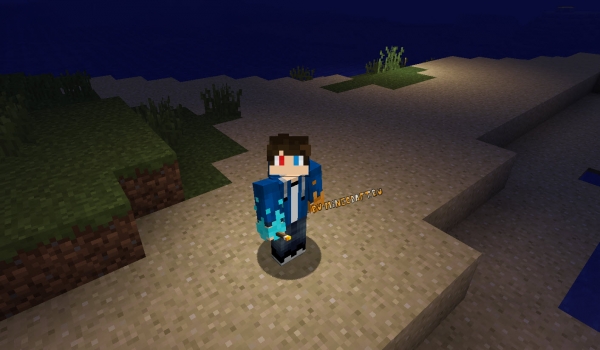 Демонстрация динамического освещения в оптифайне, красиво и реалистично
Шейдеры — меню выбора и настроек шейдеров, скачайте шейдеры для майнкрафта и поместите архивы в папку \.minecraft\shaderpacks
После вы сможете включить их, а для настройки каждого шейдерпака есть кнопка справа снизу, там можно изменять различные параметры, у каждого пака они разные.
![Скачать оптифайн - Optifine HD [1.20.1] [1.19.4] [1.18.2] [1.17.1] [1.16.5] [1.12.2] [1.7.10]](https://ru-minecraft.ru/uploads/posts/2019-11/medium/1574790164_menu-shaders-optifine.jpg)
Динамика поля зрения — позволяет поле зрения во время полета или бега
Вкладки
Качество — множество настроек влияющих на скорость игры и качество, совмещения текстур, улучшение снега, шрифта, воды.
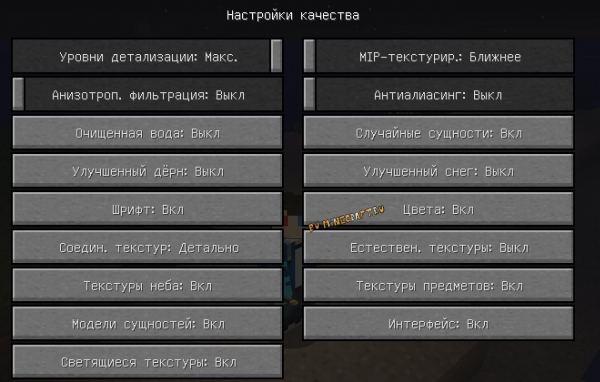 настройки влияющие на качество картинки
Производительность — настройки связанностью с производительностью игры.
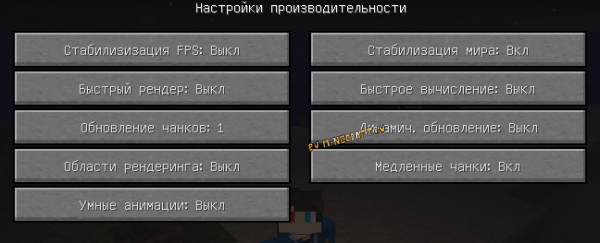 Настройки производительности игры в оптифайне
Прочее в этом меню можно включить отображение FPS, отключить погодные эффекты, изменить качество создаваемых скриншотов и прочее.
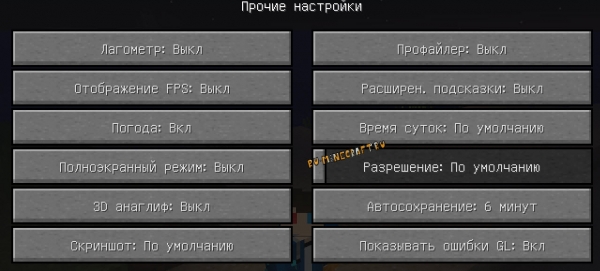 прочие настройки
Настройки элементов игры — здесь вы сможете изменить высоту облаков, качество и прозрачность листвы, отключить солнце и луну, звезды, плащи, убрать небо и туман, отключить тени сущностей.
![Скачать оптифайн - Optifine HD [1.20.1] [1.19.4] [1.18.2] [1.17.1] [1.16.5] [1.12.2] [1.7.10]](https://ru-minecraft.ru/uploads/posts/2019-11/medium/1574802451_4.jpg)
![Скачать оптифайн - Optifine HD [1.20.1] [1.19.4] [1.18.2] [1.17.1] [1.16.5] [1.12.2] [1.7.10]](https://ru-minecraft.ru/uploads/posts/2019-11/medium/1574801863_listva.jpg)
Настройки анимаций — вы сможете отключить любую анимацию в игре, движение огня, портала, воды или лавы, все это может помочь увеличить ФПС.
![Скачать оптифайн - Optifine HD [1.20.1] [1.19.4] [1.18.2] [1.17.1] [1.16.5] [1.12.2] [1.7.10]](https://ru-minecraft.ru/uploads/posts/2019-11/medium/1574802424_5.jpg)
Оптимизирует игру, повышает FPS:
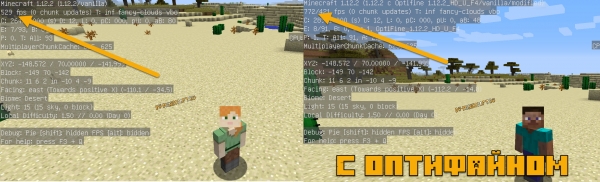 Пример как оптифайн повышает фпс в майнкрафте
Вы так же можете изменить настройки влияющие на производительность и добиться еще больших результатов.
Улучшает текстуры и дает больше возможностей:
Оптифайн сам по себе улучшает работу с текстурами, сглаживает края, более качественно соединяет их, но основной фишкой является намного большая гибкость в текстурировании блоков при создании текстурпаков.
Так, многие текстурпаки могут работать исправно только с оптифайном, например текстура зомби с оторванной головой, либо паки на сезоны времен года .
Оптифайн дает возможность создавать не только дополнительные слои текстур, но и создавать цветовую карту текстур, что позволяет плавно менять цвет текстур в зависимости от времени года.
Улучшает снег и дерн, очищает воду:
В настройках качества вы можете включить опцию чистой воды, она станет более прозрачной.
Улучшить снег, он сможет лежать на блоках с травой.
Включить опцию улучшения снега и дерна, многие блоки будут покрыты дерном или снегом полностью, что сделает картинку намного более реалистичной и естественной.
![Скачать оптифайн - Optifine HD [1.20.1] [1.19.4] [1.18.2] [1.17.1] [1.16.5] [1.12.2] [1.7.10]](https://ru-minecraft.ru/uploads/posts/2019-11/medium/1574792806_better-snow.jpg)
![Скачать оптифайн - Optifine HD [1.20.1] [1.19.4] [1.18.2] [1.17.1] [1.16.5] [1.12.2] [1.7.10]](https://ru-minecraft.ru/uploads/posts/2019-11/medium/1574792802_water-optifine.jpg)
![Скачать оптифайн - Optifine HD [1.20.1] [1.19.4] [1.18.2] [1.17.1] [1.16.5] [1.12.2] [1.7.10]](https://ru-minecraft.ru/uploads/posts/2019-11/medium/1574793089_better-dirt.jpg)
Оптифайн обладает встроенной системой динамического освещения (включается в настройках.)
Благодаря этому светящиеся объекты испускают свет всегда, даже когда находятся в руках при ходьбе.
Демонстрация динамического освещения в оптифайне, красиво и реалистично
Стоит отметить, что функция динамического освещения дополнительно нагружает ваш ПК.
Невероятная функция оптифайна — это поддержка шейдеров, специальных модов которые невероятным образом меняют графику в игре, я просто дам ссылку на категория где можно скачать шейдеры для майнкрафт и покажу несколько скриншотов.
How To Install Optifine in PoJavLauncher (2022)
I will show you How To Install Optifine in PoJavLauncher in this Minecraft Tutorial. It’s finally here guys! You can have Optifine on Minecraft Mobile! We can achieve this by installing PoJavLauncher on your mobile phone, it doesn’t matter if you have iOS or Android.
I’m happy to show you a quick way to install Optifine in PoJavLauncher. PoJavLauncher is a new Minecraft Launcher for mobile devices, iOS and Android. Thanks to this Minecraft Launcher, you can now have Minecraft Java Edition on mobile and that means you can install optifine as well! It is literally Minecraft from PC for mobile device!
Download Links are down below
Just a quick note before we begin. Please take a deep breath and stay focused so you won’t do any mistakes. If you do then it will lead up to fail and that is not a good thing. However, you can contact me anytime without any problems, i’m always here for you. You can find me here on my website or on my YouTube channel.
How To Download Optifine for PoJavLauncher
First off, scroll down to the downloads section. You can find the download button for Optifine, so simply scroll down and click on download Optifine. It will open up the redirection website which is completely safe for you. Click on download optifine for pojavlauncher again, now you should appear on the optifine website.
Go to the downloads section and find the Optifine version you want to use. It really doesn’t matter which one you use, just look for the version and download it. Before we go to the installation process, go to the App Store or Google store and download File manager. You will need to use this in order to install Optifine in PoJavLauncher.
How To Install Optifine for PoJavLauncher
Let’s assume you have PoJavLauncher installed. Go to your File Manager and find downloads folder, you should see Optifine File in there. Double tap on Optifine and it should install itself. Go to games folder -> PoJavLauncher and click on the three dots that are on the right top corner and go to settings. Find hidden items and make sure it’s enabled.
.minecraft folder should appear right now, scroll down and find versions folder. Make sure you have optifine in there, if not, then there is some issues. Open PoJavLauncher and sign in or continue without signing in. Click on options and choose launch a mod installer. Find the download directory and choose optifine. Go back to versions and scroll all the way down to Optifine. That’s it! You can play PoJavLauncher with Optifine right now!
Downloads:
That’s it!
I know, it’s sad but yes, it’s over. This is everything for this awesome tutorial about How To Install Optifine in PoJavLauncher! If you found any issues or you did something wrong don’t worry, you can always contact me and I will help you with everything. You can also find me on my YouTube Channel with the same name like here.