Моды для Plants vs. Zombies "Мод Новые Растения и Зомби (Финальная версия)"
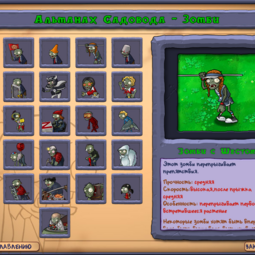
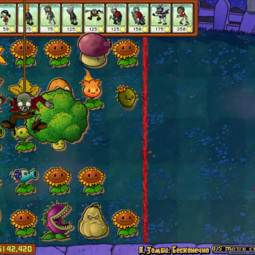
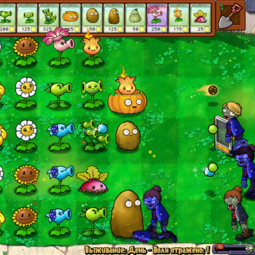
Это мой крупный авторский мод, который заменяет многие растения и зомби на новые. Меняется их внешний вид и описание, механика игры при этом не затронута, поэтому все способности растений и зомби останутся прежними.
В данную сборку входят все мои предыдущие моды, которые я выкладывала на этот сайт по отдельности. Теперь вы с лёгкостью сможете скачать их одним файлом и установить. Если вы захотите установить модификации для игры по отдельности, то ссылки на все моды которые входят в эту сборку я оставлю в разделе «Мои моды для Plants vs. Zombies» Так же в эту модификацию входят несколько модов, которые я не публиковала ранее.
Список изменений в финальной версии:
- У «Кукурузной Пушки» изменены текстуры и анимация глаз
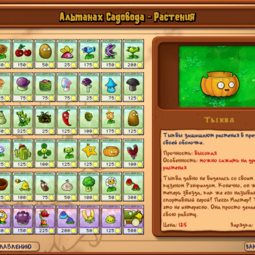
- Для «Тыквы» добавлены анимированные глаза и выражения лиц (в зависимости от уровня повреждений меняется выражение лица)
- Изменён внешний вид «Спорогриба»
- У растений «Лист Кувшинки» и «Колючая Водоросль» улучшены текстуры и анимация глаз
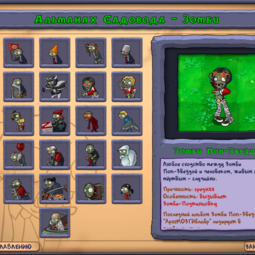
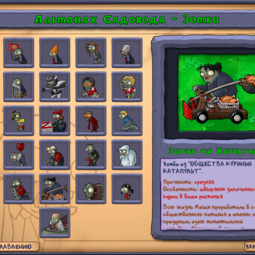
- Изменён внешний вид и описание «Зомби на Катапульте» также заменён метательный снаряд для этого зомби, вместо баскетбольных мячей теперь курицы-гриль
- У «Зомби с лестницей» улучшено качество текстур и анимация движений
- «Улитка» из Сада Дзен заменена на «Пчёлку» (Пчёлка создана по образу «Пчелы Берни» из игры PvZ 2: It’s About Time) «Шоколад» заменён на «Баночку с мёдом»
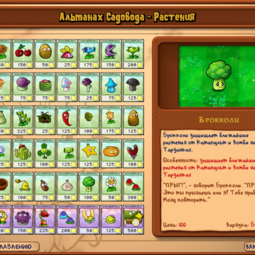
- Растение «Пальма Зонтик» заменено на «Брокколи»
- У «Капустопульты», «Малинопульты» и «Ежевикопульты» земенены текстуры листиков
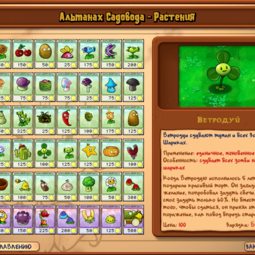
- Изменён внешний вид «Ветродуя»
- У «Цветка Кувшинки» анимированы лепестки цветочка
- У «Цветущего Горохострела» анимированы лепестки цветочка, название заменено на «Горохоцвет»
- Заменены текстуры и анимация солнца
- Улучшены текстуры тумана (при отключенном 3d-ускорении)
- Заменены иконки для достижений и мини-игр
- Также в сборку входят все мои предыдущие моды, которые были выложены на сайт по отдельности с небольшими исправлениями (улучшение качества текстур, анимации и др.)
Скриншоты
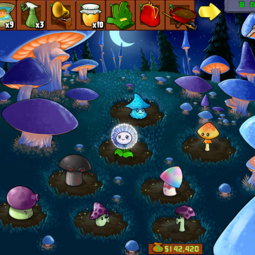
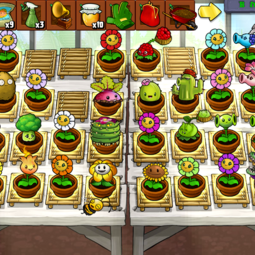
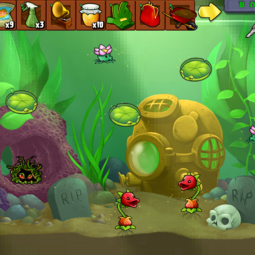
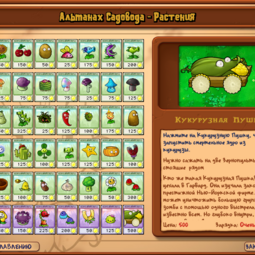
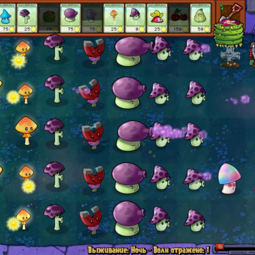
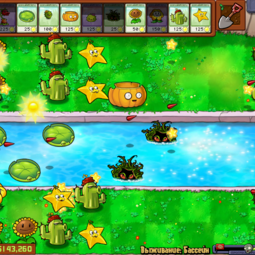
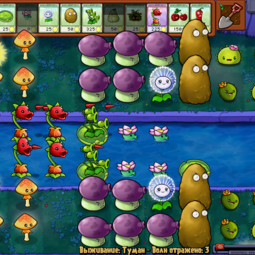
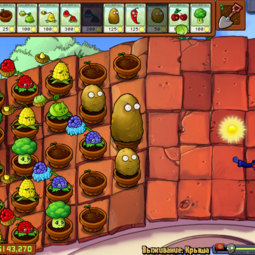
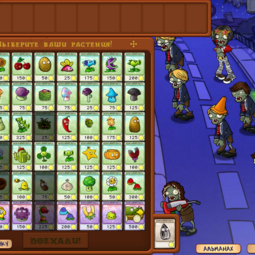
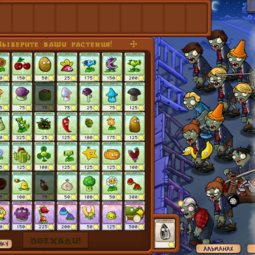
Установка и удаление
Мод состоит из двух архивов [Mod.rar] и [Backup.rar]
- Архив [Mod.rar] содержит все файлы мода и нужен для установки.
- Архив [Backup.rar] содержит оригинальные файлы игры, нужен для удаления.
Первый способ установки:
- Откройте папку с установленной игрой и найдите в ней файл [main.pak]
- В папке с игрой создайте новую папку и назовите её [backup main pak]
- Переместите файл [main.pak] в папку [backup main pak]
- Содержимое архива [Mod.rar] переместите в папку с установленной игрой (с подтверждением замены файлов). Мод установлен, запускайте игру и наслаждайтесь модом.
- Чтобы удалить мод, из папки [backup main pak](которую вы создали ранее) переместите файл [main.pak] обратно в папку с установленной игрой.
- Если после установки игра не запускается тогда устанавливайте мод по второму способу.
Второй способ установки:
- Для начала вам понадобится Утилита Popcap Pack чтобы распаковать файлы игрового архива [main.pak] этот файл находится в папке с игрой как говорилось ранее.
- Скачайте архив с утилитой Popcap Pack по ЭТОЙ ССЫЛКЕ, после этого файлы утилиты скопируйте в папку с игрой и запустите файл [unpack.bat] должно появится чёрное окно командной строки.
- После этого в папке с игрой должна появится папка [main] её содержимое вам нужно переместить в папку с игрой, затем удалить пустую папку [main] и файл [main.pak]
- После этого вы можете устанавливать файлы мода. Содержимое архива [Mod.rar] переместите в папку с установленной игрой (с подтверждением замены файлов). Мод установлен, запускайте игру и наслаждайтесь модом.
- Чтобы удалить мод, содержимое архива [Backup.rar] переместите в папку с установленной игрой (с подтверждением замены файлов).
Другие мои моды для Plants vs. Zombies
Вот список всех модов которые входят в сборку данной модификации:
- Мод «Офисный Зомби-Планктон»
- Мод «Зомби-Пати»
- Мод «Зомби Гимнастка v2.0»
- Мод «Новый Зомби на Дельфине»
- Мод «Дочь Гаргантюа»
- Мод «Гига-футбольный зомби»
- Мод «Зомби-Продавец»
- Мод «Ромашка-милашка»
- Мод «Новый Морозный Горох»
- Мод «Новые растения (Дополнение)»
- Мод «Новый Солнцегриб v2.0»
- Мод «Новый Пуфгриб»
- Мод «Новое Солнце»
Вот список других модов которые вы можете сочетать с этой модификацией:
Как установить мод на растения против зомби
Данный мод заменяет не только текстуры, но и 2d анимацию, которая сохраняется каждый раз для конкретного уровня. Из-за этого может произойти баг вылетания игры при попытке продолжить вашу мини-игру или режим "приключение". Это происходит из-за рассинхрона анимаций, чаще всего вам достаточно просто перезапустить игру и начать уровень заново (это работает для мини-игр), но если эта проблема не исчезает и игра вылетает когда вы пытаетесь продолжить режим "приключения" тогда вам придётся сделать отдельный слот сохранения для прохождения мода, как показано на скриншоте ниже
В новом слоте прохождения мода проблем с вылетом игры не будет, а если вы захотите удалить мод, то вам нужно будет вернутся обратно к своему старому прохождению. К сожалению, если это баг уже появился, по другому обойти его не получится. Но его можно предотвратить.
Возникает этот баг в тех случаях, когда вы бросили проходить уровень (в режиме "приключения" или мини-игру) на середине и не прошли его до конца, а затем установили мод, поэтому если не хотите, чтобы этот баг произошёл с вами, устанавливаете мод только после того, когда все ваши уровни уже полностью пройдены и начинаются с начала, а не сохранились на середине прохождения с возможностью "продолжить"
I found this author’s mod on the Internet and I really liked it. The mod was created for the official version of the game, but I did not find it in the Steam Workshop, so I decided to talk about this modification in this guide
The mod replaces many plants and zombies with new ones, their appearance changes and the description of the game mechanics is not affected, so all the abilities of plants and zombies will remain the same.
You can download the modification on the Playground website [bitly.ws]
The mod consists of two archives "Mod.rar" and "Backup.rar"
The archive "Mod.rar" contains all mod files that replace the original game files
The archive "Backup.rar" contains the original game files, but with the Russian translation of the text and textures of the inscriptions
Download the archive with the mod from the link I left above
Open the game folder with a path like this: \ Steam \ steamapps \ common \ Plants Vs Zombies
Find the "main.pak" file in the game folder and delete it
After that, open the mod archive if you want to install a mod with new plants then take the archive "Mod.rar" if you want to install only the Russian language and leave the original textures and animations then take the archive "Backup.rar" Copy the contents of the selected archive into the folder with the game, should a window will appear confirming the replacement of files, confirm the replacement and start the game mod installed
Right click on the game in the Steam library and select "Properties"
Open the "Local files" tab and click on the "Check the integrity of game files . "
After that, the process of restoring the original game files will start
If the game crashes after installing the mod, create a separate slot new game for the walkthrough mod
Plants vs. Zombies "Мод Extreme Hard Beta 5.0"

Это Мой глобальный мод созданный в Конце 2022 года мод заменяет графику, стандартные саундтреки, музыку, растения, зомби, интерфейс, геймплей и многое другое, преобразуя игру в совершенно новую версию.
PvZ EX HARD — это Экстремальный хардкор мод, в котором, в отличии от Остальных хардкорных модах, есть немножко баланса и интересный левел дизайн но не полностью и спорить с этим глупо, и есть новое меню. Это первый Полнейший хардкор мод на первую часть.
Plants vs. Zombies EX MODE Показывает насколько же можно усложнить игру и точто brutal X mode это ещё не придел и точто есть Моды На Экстремальных Хардкоров к примеру тот же самый хардкор: ULTRA HARDCORE и подобных, Я решил сделать мод который не мог ещё сделать никто. в некоторых моментов мод сложнее чем Ultra hardcore В 2 раза, исправлен баг со спавном зомби, теперь всё зависит от скилла и навыка, лишь на очень сложных уровнях зависит от рандома и то в начале, и есть новые текстуры.
Мод полностью изменяет гемплей и усложняет его очень сильно так что это уже не прежний пвз, но текстурно мод тоже изменён, в моде много скриптов так что скучно не будет;)

На сайте PlayGround вы сможете скачать много различные версии данного мода на русском языке:
- PvZ Exrtreme Hardcore Beta 5.0 — на данный момент это Новейшая версия мода и маленькое обновления, опубликованная автором в 22 Октября 2022 года. В настоящее время Nats продолжает разработку мода. Отчёты о разработке можно увидеть на его ютуб-канале.
- PvZ Extreme Hardcore Beta 4.8 опубликованная автором в Сентябре 2022 года, данная версия также поддерживает широкоформатный режим
Скриншоты Спойлеры:
 Ночь
Ночь  День
День  Уровень 1-1
  Бассейн
  Альманах Зомби
  Альманах растения
  Дзен сад
  Добавлено 2 новых зомби хп у них от 270 до 3000


Добавлен новых зомби портал, он быстро стреляет 4 горошинами добавлены новые виды горохострелов, они в 2 раза быстрее стреляют


Добавлен новых Зомби Молот он давит растения Добавлен новый зомби удобрения,после его смерти спавниться зомби горох


Зомби на Тарзанки имеет теперь ведро, и теперь он будет защищять зомби пока его не убьёшь и спустя 8 минут примерно, он начинает воровать растения  Крыша
Крыша  Гаргантюа теперь Имеет 4800 хп а гигантские 10000 хп, и когда вы сносите ему половину здоровья он начинает бесконечно призывать зомби со шкатулкой, у которых 1300 хп и они взрываются
Это были не все изменения а лишь часть их, все изменения вы можете посмотреть скачав мод
Инструкция по установке и удалению мода:
- Установка: Данный мод способен работать автономно от оригинальной игры, извлеките содержимое архива с выбранной версией мода в чистую папку и запустите файл PlantsVsZombies.exe (в папку с оригинальной игрой, файлы с модом скидывать не нужно)
- Удаление: Чтобы удалить мод, просто удалите папку с разархивированными файлами мода.
- Примечание:Мод способен работать автономно от основной игры, но при создании файлов сохранения он ссылается на оригинальный игровые файлы, поэтому не стоит запускать оригинальную версию игры и различные версии мода одновременно, это может привести к ошибкам и вылетам (запускайте мод и оригинальную игру по отдельности)
- Упоменания:Игнорьте ошибку partner.xml,в будущим мы её постараемя исправить как и другие ошибки,Также в папке Help вы можете посмотреть что и кто изменял что то
Авторы мода: Asir Бессмертный, Nats, Obotanica, Flower, Mirobeme II
Modify Plants vs. Zombies
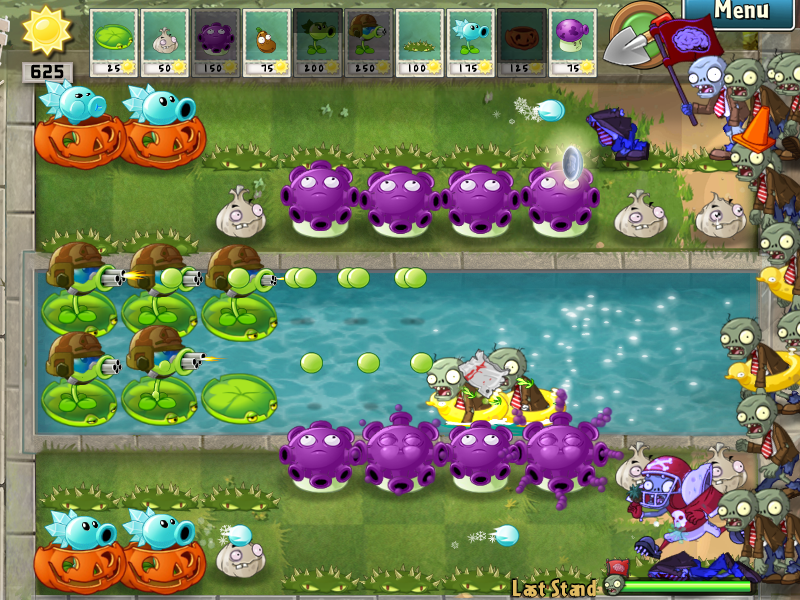
An example of a modded Plants vs. Zombies with new textures and animations.
This page will tell you how to modify Plants vs. Zombies.
Modification will allow you to change the art, sound, animation, and many other features of Plants vs. Zombies.
Contents
Before Modifying [ ]
There is a file called «main.pak» which contain files that you are using later on to edit. You’ll have to extract the pack first using this tool, QuickBMS with Plugins or using PopStudio.
- data: Contains the game’s font.
- properties: In this folder, only LawnStrings.txt should be messed with. This file contains all the texts in the game, like Almanac entries, Crazy Dave’s speeches, etc. Game of The Year version has a new file: ZombatarTOS.txt (Zombatar’s Terms Of Service), but it’s NOT recommended that you mod this file, since you may violate some laws.
- compiled: This folder contains files in a .compiled format, and they define the body parts placement and movements of characters in the game (For more info see this topic). Modifying them is possible, but pretty difficult (See this topic).
- images: Contains various images (but not all, unlike what the name suggests) in the game, like lawns backgrounds, items in the game, etc.
- particles: Contains images for «particles» like splats, chunks, explosions. and zombie heads when they’re decapitated.
- reanim: Contains the characters’ body parts, like plants, zombies, Crazy Dave, and more. This can be used to change pictures and stats of plants.
- sound: Like what the name suggests, this folder contains various sounds of the game and could be modified like the images too. Most of them are in .ogg format, with the exception of 2 in .au format. The game’s music is in here too, in .mo3 format. Programs like OpenMPT can open, edit and save .mo3 files
Squash on water, Tangle Kelp on land, unmodified Fume-shrooms and strange plants

Water pots, sleeping Sun-shrooms in a «roof night» setting
Change venue [ ]
Go to images folder, find background1.jpg (Day), then copy the file to your folder and edit it with photo editor, such as Adobe Photoshop. After editing, replace the original file in the images folder to the file you have created.
Change Almanac entry [ ]

Modded the normal Football Zombie with the Giga-Football Zombie
Note: You can also use a hex editor or Cheat Engine.
Go to properties folder, open «LawnStrings.txt». then find the entry you want to edit. For example:
[PEASHOOTER_DESCRIPTION]
Peashooters are your first line of defense. They shoot peas at attacking zombies.
«Hard work, commitment, and a healthy, well-balanced breakfast of sunlight and high-fiber
carbon dioxide make it all possible.»
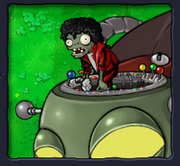
Messing with the compiled folder: old Dancing Zombie on Zombot
Then change the text accordingly. After that, save the text file.
The meanings of the words surrounded by an < or >:
- Almanac:
- SHORTLINE — Creates a short gap in the text just like the keyboard key: «Enter.»
- KEYWORD — a word describing what damage or things it does. Changes the font color to brown.
- STAT — makes letters red.
- KEYMETAL — Makes the text hidden until Magnet-shroom is unlocked. Used in the entries for zombies that have metalobjects.
- METAL — Same function as KEYMETAL.
- FLAVOR — the description of the plant and/or zombie. Only seen at Almanac entry but can also be used anywhere else in the Almanac description. Changes the font color to brown.
- NOCTURNAL — makes letters violet.
- AQUATIC — makes letters light blue.
- PLAYER_NAME — Your name.
- MONEY — The amount of Money you currently have.
- NO_CLICK — Triggers Crazy Dave without clicking. Just mouse it. Used at shop and during the 7 seeds prompt (as you press yes/no instead of clicking him)
- NO_SOUND — Makes Crazy Dave speech silent. Used at shop.
- SCREAM — Makes Crazy Dave scream.
- SHAKE — Makes Crazy Dave do his «BECAUSE I’M CRAZY!» dialogue line and effect.
- MOUTH_SMALL_SMILE — Makes Crazy Dave smile when he is finished speaking.
- MOUTH_BIG_SMILE — Makes Crazy Dave grin when he is finished speaking.
- SHOW_WALLNUT — Makes Crazy Dave show you a Wall-nut. Used in Level 1-5.
- SHOW_HAMMER — Makes Crazy Dave show you a Mallet. Used in Level 2-5.
- SHOW_MONEYBAG — Makes Crazy Dave show you a Money bag. Used after completing Level 4-4, when giving Crazy Dave the Taco.
- SHOW_TREE_FOOD — Makes Crazy Dave show you Tree Food. Used when you visit the Tree of Wisdom for the first time.
- HANDING — Makes Crazy Dave show nothing in his hand. This is only used in Upsell, when Crazy Dave is showing the Squash in his hand, but if used anywhere else, nothing will appear.
Get Survival: Roof (Night) [ ]
- Go to Dr. Zomboss’s Revenge, then quit after a while.
- Change the value to Whack a Zombie and kill every zombie (including Zomboss) and collect sun.
- Then Change it to Survival: Roof or Survival: Roof (Hard) or Survival: Roof (Endless).
- COMPLETE.
Switch Plants [ ]
You can make a Peashooter give sun or a Sunflower lob melons if you want. All you have to do is go into the compiled/reanim folder and switch two files (like Sunflower and Peashooter). Make sure the names are exactly the same or the game will not be able to start. If you want to have two of the same sprite for plants, just duplicate the file for Sunflower.reanim, and call another one Threepeater.reanim. Make sure the real Threepeater file is renamed something else. You can do this with other images too, like making the Melon-pult shoot wheels, or you can make the pictures for anything change.
Modifying animation trajectories [ ]
How to customize plants? Make your own plant! Homemade plants, Pvz hack tools (PvZ Plus)
A tutorial by Jm Nzhl.
Before changing the animations, a copy of Adobe Flash/Animate must be installed, and the version must be greater than CS4 owing to the necessary .jsfl file required to compile the fla files to reanim. It’s also highly recommended to have prior experience with these programs, as knowing what you’re doing will make the editing process much more straightforward.
Also note that this method only works for the original release of Plants vs. Zombies — the GOTY version will be unaffected.
Note: this will only work for reanim.compiled
First, download the necessary files from this video:
An example of the right (left) and wrong (right) ways to organize a .fla file for conversion to .reanim.
Then open up one of the .fla files that you wanted to change the animations with. Make sure to not remove the anim layers included in the .fla files, as this will cause the game to crash. If you want to add additional files, you can drag and drop images you have saved onto the canvas.
After you’re done editing your plants, or zombies’ trajectory, make sure to put every additional files you have added (if there’s any) to the reanim folder, or otherwise the game will crash. Then find the FlashReanimExport.jsfl included with the fla files and drag it into Flash.
If an error pops up, it means that you’ve done something wrong. An easy error to trigger is «TypeError: frame has no properties» — this can be solved by making sure every layer has frames extending to the end of the animation, and that the length of the animation is no different than that of the original.
After the script is finished running, it’ll create a .reanim file in the same folder as your .fla is saved. Now for the last steps, you need to cut it and paste it on the compiled\reanim folder and open up PVZUtil 1.0 to convert your reanim file into a .reanim.compiled file. Enjoy modding!
Modifying Gameplay [ ]
This is much more advanced than simple texture modding or animation swapping. Since Plants vs. Zombies is compiled, most modding will require you to edit the actual exe file. This can be done with a program such as HxD. Lists of what hex addresses do what can be found throughout the internet, for example this doc. Most modding is done in the original version of the game, not the Game of the Year version. Each version of the game uses different hex addresses for each thing, but both are still moddable in the same ways provided you know which addresses correspond with eachother.
Note: If an address is above 400,000 and you are using HxD, subtract 400,000 in a hex calculator. Not all addresses will work properly.
First, open HxD. With Ctrl + O, you can select PvZ1 EXE
Next, find an address you want to change. The address is the hex value next to something. For example, Peashooter’s recharge in non-GOTY is 29F2C4. When you find an address, press Ctrl + G and paste the address. Press enter. This will automatically go to the hex code that determines the recharge of peashooter in this case. At the right side, in data inspector you should see the value that it said it should be in the document. In some cases you may need to check hexadecimal base to see the proper address. At the side in data inspector, you can change the value to anything you want. For example, you can change Peashooter’s recharge to 200, which is 2 seconds. Repeat this process for any address you want to modify. When you are done, Ctrl + S to save (you can’t load PvZ otherwise)
If you mess something up with the EXE and it refuses to start, you have to restart your modding with a new EXE unless you have a backup.
Level editing [ ]
To modify the length of levels and what zombies spawn in each level, you will need to modify the hex values of the game exe.
The location of adventure level data is stored at the following hex addresses (in HxD, some other programs you may need to add 400000 to the address):
| Original PvZ (Not Game of the Year) | 2A34E8 |
| PvZ Game of the Year edition | 4D125A |
| Bloom and Doom (December 2008 beta) | 293080 |
The first 50 values is the level length. The number stored is the amount of zombie waves that will spawn in the level, with every 10th being a huge wave. Levels can be set to have a number other than a multiple of 10, and will thus not end on a huge wave. The first levels have special code which overwrites this, so it is not recommended to edit them.
The following is the level lengths for the original version of Plants vs. Zombies:
| Level: | 1-1 | 1-2 | 1-3 | 1-4 | 1-5 | 1-6 | 1-7 | 1-8 | 1-9 | 1-10 | 2-1 | 2-2 | 2-3 | 2-4 | 2-5 | 2-6 | 2-7 | 2-8 | 2-9 | 2-10 | 3-1 | 3-2 | 3-3 | 3-4 | 3-5 | 3-6 | 3-7 | 3-8 | 3-9 | 3-10 | 4-1 | 4-2 | 4-3 | 4-4 | 4-5 | 4-6 | 4-7 | 4-8 | 4-9 | 4-10 | 5-1 | 5-2 | 5-3 | 5-4 | 5-5 | 5-6 | 5-7 | 5-8 | 5-9 | 5-10 |
|---|---|---|---|---|---|---|---|---|---|---|---|---|---|---|---|---|---|---|---|---|---|---|---|---|---|---|---|---|---|---|---|---|---|---|---|---|---|---|---|---|---|---|---|---|---|---|---|---|---|---|
| Hex location (6A. ) | 34E8 | 34EC | 34F0 | 34F4 | 34F8 | 34FC | 3500 | 3504 | 3508 | 350C | 3510 | 3514 | 3518 | 351C | 3520 | 3524 | 3528 | 352C | 3530 | 3534 | 3538 | 353C | 3540 | 3544 | 3548 | 354C | 3550 | 3554 | 3558 | 355C | 3560 | 3564 | 3568 | 356C | 3570 | 3574 | 3578 | 357C | 3580 | 3584 | 3588 | 358C | 3590 | 3594 | 3598 | 359C | 35A0 | 35A4 | 35A8 | 35AC |
| Hex value : | 04 | 06 | 08 | 0A | 08 | 0A | 14 | 0A | 14 | 14 | 0A | 14 | 0A | 14 | 0A | 0A | 14 | 0A | 14 | 14 | 0A | 14 | 14 | 1E | 14 | 14 | 1E | 14 | 1E | 1E | 0A | 14 | 0A | 14 | 14 | 0A | 14 | 0A | 14 | 14 | 0A | 14 | 14 | 1E | 14 | 14 | 1E | 14 | 1E | 1E |
| Decimal value: | 4 | 6 | 8 | 10 | 8 | 10 | 20 | 10 | 20 | 20 | 10 | 20 | 10 | 20 | 10 | 10 | 20 | 10 | 20 | 20 | 10 | 20 | 20 | 30 | 20 | 20 | 30 | 20 | 30 | 30 | 10 | 20 | 10 | 20 | 20 | 10 | 20 | 10 | 20 | 20 | 10 | 20 | 20 | 30 | 20 | 20 | 30 | 20 | 30 | 30 |
After the level length data, there is the zombie data for each level.
There are 50 levels in adventure, which means that there will be 50 values for each zombie. 1 means the zombie will appear in the level, and 0 means the zombie will not appear in the level. Between the zombie values there will be a singular address which will be a number corresponding with the zombie in question.
For example, in the non-GOTY PvZ, the address 2A3814 will be 03 indicating that the following 50 addresses will show what levels zombie number 03 will spawn in. Zombie 03 is the pole vaulting zombie, which appears in levels 1-6, 1-7, 1-9, 1-10, 2-4, 3-4, 3-9, 5-2. Therefore, there will be hex 01 on the corresponding with each of these levels. Note how some mini-game levels have special code, which is why the pole vaulting zombie is set to spawn in 2-5 but doesn’t and why it spawns in 5-10 despite the level data not saying it. If you would like for the pole vaulting zombie to spawn in level 3-1 for example, all you need to is to go 21 addresses after the initial address containing the 03 and then set it to 01.
The following is the spawn data from the original version of Plants vs. Zombies. Note how this data is not entirely accurate, as other code exists that contradicts it. For example the aforementioned 2-5, which always spawns zombies from graves and thus does not use this data. Additionally, certain zombies are hardcoded to spawn on certain levels, notably the first one they appear in. The bungee zombie can also appear on every roof level whenever it summons zombies on the final wave, and the ducky tube zombie can also appear on every pool level.