How to Use the ClearSpawnpoint Command in Minecraft
This Minecraft tutorial explains how to use the /clearspawnpoint command with screenshots and step-by-step instructions.
You can use the /clearspawnpoint command to remove the spawn point for a player and reset the player’s spawn back to the World spawn point.
Let’s explore how to use this game command.
Supported Platforms
The /clearspawnpoint command is available in the following versions of Minecraft:
| Platform | Supported (Version*) |
|---|---|
 Java Edition (PC/Mac) Java Edition (PC/Mac) |
No |
 Pocket Edition (PE) Pocket Edition (PE) |
Yes (1.16.100) |
 Xbox 360 Xbox 360 |
No |
 Xbox One Xbox One |
Yes (1.16.100) |
 PS3 PS3 |
No |
 PS4 PS4 |
Yes (1.16.100) |
 Wii U Wii U |
No |
 Nintendo Switch Nintendo Switch |
Yes (1.16.100) |
 Windows 10 Edition Windows 10 Edition |
Yes (1.16.100) |
 Education Edition Education Edition |
Yes (1.17.30) |
* The version that it was added or removed, if applicable.
NOTE: Pocket Edition (PE), Xbox One, PS4, Nintendo Switch, and Windows 10 Edition are now called Bedrock Edition. We will continue to show them individually for version history.
Requirements
To run game commands in Minecraft, you have to turn cheats on in your world.
ClearSpawnpoint Command
- PE
- Xbox
- PS
- Nintendo
- Win10
- Edu
ClearSpawnpoint Command in Minecraft Pocket Edition (PE)
In Minecraft Pocket Edition (PE), the syntax to clear the spawn point for a player and reset to the World spawn point is:
Definitions
- target is the name of a player (or a target selector) whose spawn point you wish to clear.
ClearSpawnpoint Command in Minecraft Xbox One Edition
In Minecraft Xbox One Edition, the syntax to clear the spawn point for a player and reset to the World spawn point is:
Definitions
- target is the name of a player (or a target selector) whose spawn point you wish to clear.
ClearSpawnpoint Command in Minecraft PS4 Edition
In Minecraft PS4 Edition, the syntax to clear the spawn point for a player and reset to the World spawn point is:
Definitions
- target is the name of a player (or a target selector) whose spawn point you wish to clear.
ClearSpawnpoint Command in Minecraft Nintendo Switch Edition
In Minecraft Nintendo Switch Edition, the syntax to clear the spawn point for a player and reset to the World spawn point is:
Definitions
- target is the name of a player (or a target selector) whose spawn point you wish to clear.
ClearSpawnpoint Command in Minecraft Windows 10 Edition
In Minecraft Windows 10 Edition, the syntax to clear the spawn point for a player and reset to the World spawn point is:
Definitions
- target is the name of a player (or a target selector) whose spawn point you wish to clear.
ClearSpawnpoint Command in Minecraft Education Edition
In Minecraft Education Edition, the syntax to clear the spawn point for a player and reset to the World spawn point is:
Definitions
- target is the name of a player (or a target selector) whose spawn point you wish to clear.
Examples
- PE
- Xbox
- PS
- Nintendo
- Win10
- Edu
Example in Pocket Edition (PE)
To reset the spawn point for the player named DigMinecraft in Minecraft PE:
Example in Xbox One Edition
To reset the spawn point for the nearest player in Minecraft Xbox One Edition:
Example in PS4 Edition
To reset the spawn point for all players in Minecraft PS4 Edition:
Example in Nintendo Switch Edition
To reset the spawn point for a random player in Minecraft Nintendo Switch Edition:
Example in Windows 10 Edition
To reset the spawn point for the nearest player in Minecraft Windows 10 Edition:
Example in Education Edition
To reset the spawn point for all players in Minecraft Education Edition:
How to Enter the Command
1. Open the Chat Window
The easiest way to run a command in Minecraft is within the chat window. The game control to open the chat window depends on the version of Minecraft:
- For Pocket Edition (PE), tap on the chat button at the top of the screen.
- For Xbox One, press the D-Pad (right) alt=»xbox one» width=»21″ height=»21″ />on the controller.
- For PS4, press the D-Pad (right) alt=»ps4″ width=»21″ height=»21″ />on the controller.
- For Nintendo Switch, press the right arrow button on the controller.
- For Windows 10 Edition, press the T key to open the chat window.
- For Education Edition, press the T key to open the chat window.
2. Type the Command
In this example, we will reset the spawn point for the player called DigMinecraft with the following command:
Type the command in the chat window. As you are typing, you will see the command appear in the lower left corner of the game window. Press the Enter key to run the command.
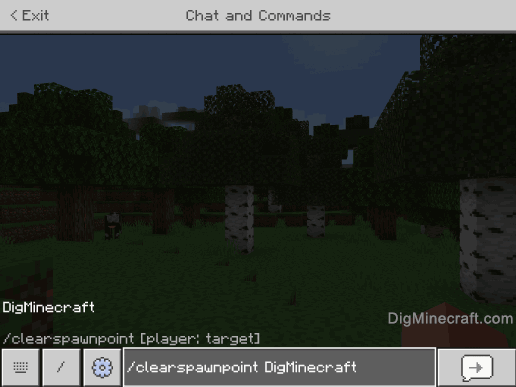
Once the cheat has been entered, the /clearspawnpoint command will clear the player’s spawn point.
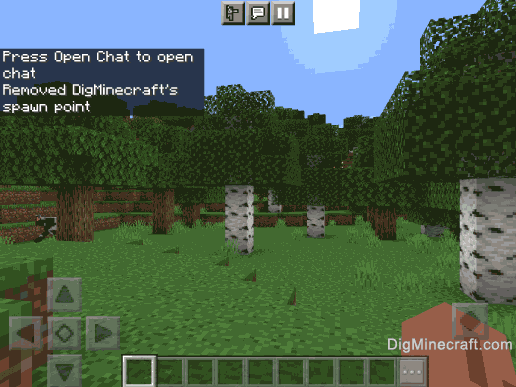
In this example, the /clearspawnpoint command displays the message " Removed DigMinecraft’s spawn point ". Now DigMinecraft’s spawn point has been removed and the DigMinecraft’s spawn will be reset to the World spawn point.
Congratulations, you just learned how to use the /clearspawnpoint command in Minecraft!
Команды консоли/clearspawnpoint
Определяет игрока, точка возрождения которого должна быть удалена. Если не указано, по умолчанию используется ( @s ).
Не выполняется, если неверно указаны аргументы. Не выполняется, если аргументу player: target не удаётся определить игрока в многопользовательской игре. Не выполняется, если player: target не указан и исполнитель команды не игрок. Не выполняется, если точка возрождения уже удалена. В случае успеха удаляет точку возрождения игрока на определённых координатах.
Как убрать спавнпоинт в майнкрафте команда — Сайт о Игре Minecraft
Как убрать спавнпоинт в майнкрафте команда — Советы и Инструкции
Для того, чтобы убрать спавнпоинт в Minecraft, необходимо выполнить следующие шаги:
1. Откройте игру и войдите в мир, где находится спавнпоинт, который вы хотите убрать.
2. Откройте консоль команд, нажав на клавишу «/».
3. Введите команду «/spawnpoint» и нажмите клавишу «Tab», чтобы автоматически дополнить ее.
4. После «/spawnpoint» введите ваш никнейм (ваше имя в игре), либо никнейм игрока, которому принадлежит спавнпоинт, если это не ваш спавнпоинт.
5. Если вы не указали конкретные координаты спавнпоинта, он автоматически установлен в вашем текущем местоположении, и вы можете его удалить, указав команду «/spawnpoint clear [никнейм]».
Теперь спавнпоинт должен быть убран. Дополнительный совет: вы можете также убрать спавнпоинт, используя функцию редактора мира или программу-редактор миров, если вы играете в Minecraft на ПК (как Java Edition, так и Bedrock Edition). Это может быть полезно, если вы хотите убрать несколько спавнпоинтов одновременно или если вы испытываете проблемы с выполнением команд в игре.
How can I reset my spawnpoint and spawn back at worldspawn?
I set up a player spawnpoint using the /spawnpoint command. Now I just want to return to spawning at the world spawn.
Is this at all possible? I’ve tried /kill and I just keep spawning at my player spawn.

20×20 area centered on the worldspawn, on the highest solid block for any given xz coordinate, which is quite different from spawning at a precise set of xyz coordinates that happen to coincide with the world spawn area.
1 Answer 1
The /spawnpoint command does not have a reset functionality built in, but there are other ways of doing this.
The simplest fix is to lie in a bed to set your spawnpoint to the bed, then destroy it and kill yourself. You will get the «Your home bed was missing or obstructed» message, and your personal spawnpoint will be completely unset.
More technical explanation, tested with Minecraft 1.8.4 and NBTExplorer:
Using /spawnpoint will set 4 different NBT tags for the player: SpawnX , SpawnY , SpawnZ stores the coordinates, and SpawnForced is set to 1, which means the game will not look for a bed in the vicinity of your spawnpoint.